Blog

  • AI Product Photography: Tips for Perfect Product Photos

    AI Product Photography: Tips for Perfect Product Photos

    AI Product Photography: Tips for Perfect Product Photos

    Do you want great product photos for your online store? AI product photography can help! It’s a new way to get professional-looking product photos using artificial intelligence. No need for a fancy photo studio or a product photographer. Let’s explore how AI can make your product photography shine.

    Understanding AI Product Photography

    What is AI Product Photography?

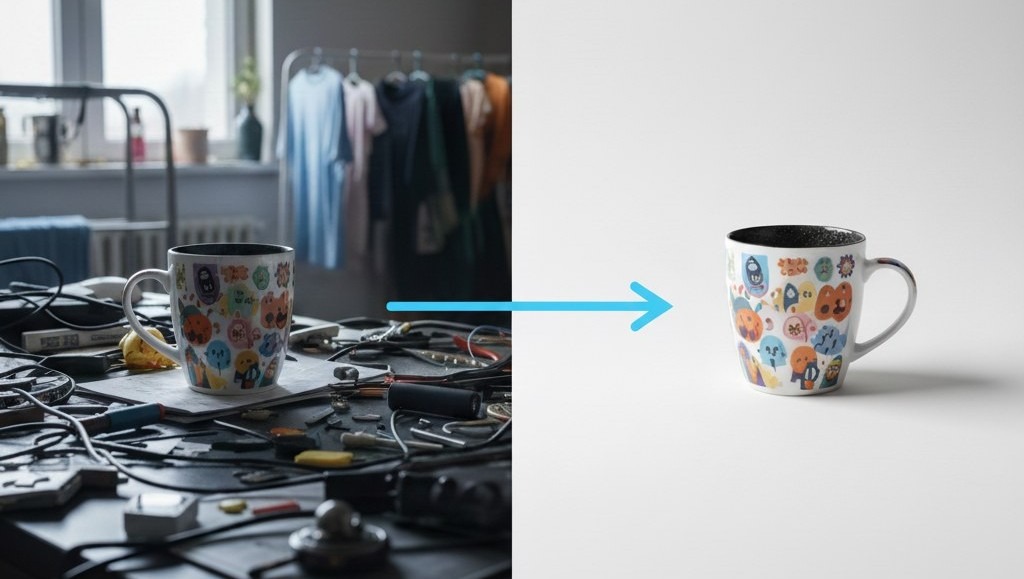
    AI product photography uses technology to create high-quality product images. Instead of a traditional product photoshoot, AI tools generate product photographs. You can get professional product photos with a clean background and perfect lighting without needing a photography studio. AI product photography is excellent for anyone who needs product photography for eCommerce but wants to save time and money.

    How Does It Work?

    AI product photography is simple. You upload a product image, and the AI does the rest. It can replace backgrounds with a white background or add props to create lifestyle photos. The AI adjusts the lighting to ensure the best light and creates natural shadows. This process gives you high-quality images that look like they were taken in a professional photography studio. It’s like having a product photographer at your fingertips.

    Benefits of AI Product Photography

    There are many benefits to using AI for product photography. It saves time and is also cost-effective. AI helps you quickly morph images to fit different online store formats. You get professional product photos ready for your product page, helping you attract more customers.

    Types of Product Photography

    Types of Product Photography

    Different Styles of Product Photography

    Product photography includes several approaches, each tailored for a specific goal. To illustrate some common techniques:

    • Studio shots typically employ a white background to ensure the product remains the central focus.
    • Lifestyle photos demonstrate the product in a real-world context, frequently incorporating props and models to enhance the presentation and help potential customers visualize themselves using the product.

    Detailed shots call attention to particular aspects of the product, and group shots present several items in a single frame. Selecting the most suitable style is crucial for meeting your product photography objectives, and each type requires different product photography lighting and photography services.

    Choosing the Right Type for Your Needs

    Selecting the right type of product photography depends on your goals. For online stores, clean, high-quality product photos with a white background are essential. If you want to showcase how a product fits into daily life, lifestyle photos are ideal. For highlighting intricate details, focus on detailed product shots. Consider your target audience and platform when deciding. Knowing which style suits your product best can significantly enhance your product page and attract more customers. Great product photos and professional-looking product photos, therefore, are very important.

    Product Photography for eCommerce

    Product photography for eCommerce is crucial for attracting customers. High-quality images help shoppers make informed decisions. Clean, professional product photos with accurate colors and details are key. Using a white background ensures the product is the main focus. Optimize your product images for fast loading times to improve the shopping experience. Showcase your product from different angles, highlighting its best features. With the help of an AI product photo generator, you can morph images without product photography setup and still get professional product photos and high-quality images.

    Setting Up Your AI Product Photo Shoot

    The Importance of Lighting

    Proper product photography lighting is crucial for high-quality product photos. Understanding the best light sources can transform a beginner’s product image into a professional product photo. Whether you use natural light or artificial light, consistent lighting helps showcase your product in use and enhances its features. Soft lighting minimizes harsh shadows, creating a clean background and visually appealing product shots. Investing in a good product photography lighting setup will significantly improve your eCommerce photography.

    Creating a DIY Product Photography Studio

    Building a DIY product photography studio doesn’t have to break the bank. Start with a seamless background, like a white background, to keep the focus on your product. Use soft lighting from multiple sources to minimize shadows. Repurpose household items as props to add visual interest. A simple product photography setup can drastically improve your product photographs. With a little creativity, you can achieve professional-looking product photos without needing a professional photography studio or the expenses of photography services.

    White Background vs. Styled Backgrounds

    Choosing between a white background and styled backgrounds depends on your product photography goals. White background shots are ideal for e-commerce. Styled backgrounds can add context and personality, making your product more relatable. For online stores, a white background is often preferred for its simplicity and consistency. However, lifestyle photos with props can create a sense of product in use, attracting more customers. The key is choosing the background that best complements your product and brand.

    Tips to Make High-Quality Product Photos

    Essential Product Photography Tips

    To get great product photos, there are essential product photography tips every beginner should know. Here are a few things to keep in mind:

    • Ensure your product is clean and well-lit.
    • Use a tripod to prevent blurry product images.

    Experiment with different angles to find the most flattering product shots. Pay attention to detail and correct any imperfections in post-processing. These product photography tips will help you create professional product photos that attract customers and boost sales. Using natural light whenever possible ensures the best light.

    Using AI Tools for Better Results

    AI tools can significantly enhance your product photography efforts. An AI product photo generator can automatically replace backgrounds and adjust product photography lighting for optimal results. Use AI image enhancers to sharpen images and remove imperfections. These tools make it easier to achieve professional product photos without extensive photography skills. AI can also help you morph images, create consistent product shots, and save time on editing. Embrace AI to streamline your product photography and create high-quality images.

    Customizing Your Product Images

    Customizing your product image is vital for branding. Use AI tools to add your logo or create unique backgrounds that reflect your brand’s identity. Adjust colors and tones to match your brand’s aesthetic. Ensure consistency across all product shots to create a cohesive look. Customization helps your product stand out and reinforces your brand image. With AI, customizing is easy, allowing you to create professional-looking product photos that resonate with your target audience and reflect your brand values for your product page.

    Real-World Applications of AI Product Photography

    For Online Stores and Amazon Sellers

    For online stores and Amazon sellers, AI product photography is a game-changer. High-quality product photos are essential to attract customers and increase sales. With AI, you can easily create professional product photos with a clean background, ensuring your product is the main focus. AI tools can also automatically optimize product photography lighting, making your product page more appealing. By using AI, you can save time and money on product photoshoots and photography services while still getting high-quality images that boost your online presence and provide great product photos to your potential customers.

    Enhancing Social Media Ads

    Enhance your social media ads with AI product photography. Compelling product shots are vital for capturing attention and driving engagement. AI can help you create eye-catching product images with the best light and professional-looking product photos, making your ads stand out. Experiment with lifestyle photos and props to showcase your product in use and appeal to your target audience. AI product photography lighting adjustments also ensure that your product always looks its best. High-quality product photography can significantly improve the performance of your social media campaigns, leading to more clicks and conversions.

    Creating Product Catalogs and Websites

    Creating product catalogs and websites becomes easier with AI product photography. Present your products with professional product photos that highlight their best features. Use high-quality product photography to ensure that your product images are visually appealing and consistent. AI tools can help you maintain a clean background and optimize product photography lighting, giving your catalog a professional look. You can also morph images and create lifestyle photos to showcase your products in different settings, enhancing the overall appeal of your website. This will improve your product photography for your eCommerce and increase customer satisfaction.

    Conclusion and Next Steps

    Why Choose AI Photo Craft?

    Choosing AI Photo Craft means opting for efficiency and quality. Our tool helps beginners and professionals alike create high-quality product photography without an expensive photography studio or a complicated product photography setup. With features like AI background replacement and automatic lighting adjustments, you can get professional product photos in minutes. AI Photo Craft simplifies the process, allowing you to focus on other aspects of your business. Transform your product photography and experience the best light with our user-friendly platform.

    Getting Started with AI Photo Craft

    Getting started with AI Photo Craft is easy. Simply upload your product image, and our AI will handle the rest. You can choose from various customization options, such as background replacement and product photography lighting adjustments, to achieve the desired look. Experiment with different settings to create unique product shots that highlight your product’s best features. Our user-friendly interface ensures a smooth experience, even for those new to AI product photography. Create high-quality images for your product page and stand out from the competition.

    Call to Action: Try AI Photo Craft Today!

    Ready to transform your product photography for your eCommerce? Try AI Photo Craft today and experience the difference. Create professional-looking product photos in minutes without needing a product photographer or a photography service. Our AI-powered tool simplifies the process, allowing you to focus on your business. Get high-quality images that attract customers and boost sales. Sign up now and discover the power of AI in product photography, and create great product photos!

  • AI Object Remover: Remove Unwanted Objects from Photos Online

    AI Object Remover: Remove Unwanted Objects from Photos Online

    Ai Object Remover

    Have you ever taken the perfect photo, only to find an unwanted object photobombing your shot? Maybe it’s a stray tourist in a scenic landscape, a power line cluttering a beautiful sky, or an ex that you want to remove from a cherished memory. With AIPHOTOCraft’s AI Object Remover, you can easily remove unwanted objects from photos online and achieve picture-perfect results in just one click!

    What is AI Object Removal?

    Understanding the Concept of AI in Photo Editing

    AI, or artificial intelligence, is changing how we edit photos. Traditional photo editing can be time-consuming and requires skill. AI technology offers a simpler way. AI photo editors can now analyze images and automatically identify unwanted elements, like a blemish on a face or an object you want to remove from a landscape. This makes photo editing accessible to everyone, regardless of their experience.

    How AI Works for Removing Unwanted Objects

    The AI object remover uses advanced AI technology to analyze the surrounding area of the unwanted object. When you select an object you want to remove, the AI intelligently fills in the space. It does this by using the colors, textures, and patterns from the nearby pixels to seamlessly replace the unwanted element. This generative AI technology ensures the object removal is smooth and natural-looking, as if the object was never there!

    Benefits of Using AI for Object Removal

    Using an AI object remover offers several advantages. In particular, it allows you to:

    • Remove unwanted objects from your photos, like distracting elements.
    • Erase people from photos or even remove watermarks.

    AI object removal helps clean up pictures, creating visually appealing images for personal or professional use. If you want to remove objects from your photos online, AI offers a fast, efficient, and user-friendly solution, even if you want to remove backgrounds.

    How to Remove Unwanted Objects from Photos

    How To Remove Unwanted Objects from Photos

    Step-by-Step Guide Using AIPHOTOCraft

    Using AIPHOTOCraft’s AI Object Remover is incredibly simple. You don’t need any special photo editing skills to achieve professional-looking results. This guide will walk you through removing unwanted objects from your photos in just a few easy steps. Whether you want to remove text, unwanted objects, or people, AIPHOTOCraft makes it easy and fast to clean up your images.

    Uploading Your Photo

    Here’s how to begin using AIPHOTOCraft. First, visit its website and find the AI Object Remover tool, where you’ll discover an intuitive interface. Then:

    • Click the “Upload Image” button to choose the photo you wish to edit.
    • AIPHOTOCraft accepts a range of image formats, making it simple to upload your images.

    This simple process allows you to quickly start removing objects with AI.

    Selecting and Removing the Object

    Once your photo is uploaded, use your mouse or finger (on touch devices) to highlight the unwanted object you want to remove. The AIPHOTOCraft object remover provides a user-friendly selection tool that allows you to accurately select the object you want to erase. After selecting the object, click the “Remove” button. The AI will then process the image and seamlessly remove the object from the photo.

    Downloading the Cleaned Photo

    After the AI has finished processing, you can preview the cleaned photo. If you’re happy with the results, simply click the “Download” button to save the edited image to your device. The downloaded photo will be free of the unwanted object, giving you a clean and professional-looking image. With AIPHOTOCraft, it’s never been easier to remove any unwanted objects and improve your photos!

    Key Features of AIPHOTOCraft Object Remover

    Fast and Efficient Results

    AIPHOTOCraft’s AI object remover delivers fast and efficient results, saving you time and effort. The advanced AI technology swiftly analyzes your photo and seamlessly removes unwanted elements in seconds. Unlike traditional photo editing methods, you don’t have to spend hours manually editing your images. With the AI object remover, you can effortlessly remove unwanted objects and get clean, professional-looking photos with just one click.

    No Editing Skills Required

    One of the best features of the AIPHOTOCraft AI object remover is that it requires absolutely no editing skills. You don’t need to be a professional photo editor to achieve amazing results. The intuitive interface and AI-powered technology do all the work for you. Simply upload your photo, select the object you want to remove, and let the AI photo editor do its magic. It’s that easy to remove unwanted objects and get perfect photos every time.

    Online Access for Free

    AIPHOTOCraft provides online access for free to its AI object remover. You can remove objects from photos online without downloading any software or paying for expensive subscriptions. Simply visit the AIPHOTOCraft website, upload your photo, and start removing unwanted objects. The online accessibility makes it convenient for anyone to clean up pictures quickly and easily. Remove unwanted objects from your photos online anytime, anywhere, completely free of charge.

    Common Use Cases for Removing Objects

    Travel Photos

    Travel photos often capture amazing moments, but sometimes unwanted objects can spoil the shot. The AI object remover is perfect for cleaning up your travel memories. You can remove people, erase unwanted signs, or get rid of distracting elements in the background. Effortlessly remove unwanted objects and create stunning travel photos that truly capture the beauty of your adventures. With the magic eraser, your travel photos can be pristine and perfect.

    Product Photos for Better Marketing

    If you’re selling products online, clean and professional-looking photos are essential. Use the AI object remover to remove unwanted objects from your product photos and enhance their appeal. Removing unwanted items, cleaning up backgrounds, or erasing distracting elements will make your products stand out. High-quality product photos lead to better marketing and increased sales. Remove any unwanted objects and make your products shine with professional-quality images.

    Enhancing Portraits

    Portraits capture special moments with loved ones, but sometimes unwanted objects can detract from the focus. The AI object remover is a great tool for enhancing portraits and ensuring the spotlight remains on the subject. You can erase people from photos, remove unwanted blemishes, or clean up the background for a more polished look. Easily remove unwanted objects and create beautiful portraits that you’ll treasure forever. With the AI photo editor, your portraits will always look their best.

    Frequently Asked Questions

    Is it Free to Use AIPHOTOCraft?

    Yes! AIPHOTOCraft’s AI object remover is available online for free. You can easily remove unwanted objects from your photos without any subscription fees. The AI object remover allows you to effortlessly remove unwanted objects and clean up your pictures without spending a dime. You can remove objects from photos online and enjoy the benefits of AI technology completely free of charge, using it as a magic eraser.

    Are My Photos Safe?

    AIPHOTOCraft prioritizes the safety and privacy of your photos. When you use the AI object remover, your images are processed securely and are not stored long-term. We use advanced AI technology to ensure that your data is protected. You can confidently remove unwanted objects from your photos, knowing that your privacy is respected. It’s easy to remove unwanted objects, and your photos are safe.

    Can I Remove People and Other Objects?

    Yes, you can! The AI object remover is versatile and can remove people and other objects from photos online. Whether it’s removing unwanted people from a travel photo or getting rid of distracting elements in product photos, the tool is designed to handle various object removal tasks. You can easily remove unwanted objects and achieve clean, professional-looking results with this AI photo editor.

    Do I Need Any Skills to Use This Tool?

    No special skills are needed to use the AIPHOTOCraft AI object remover. The tool is designed to be user-friendly, with an intuitive interface that anyone can use. You don’t need any photo editing experience to effortlessly remove unwanted objects from your photos. Simply upload your photo, select the object you want to remove, and let the AI photo editor do the rest. It’s that easy to clean up pictures.

    Conclusion: Try AIPHOTOCraft AI Object Remover Online

    Ready to say goodbye to unwanted objects in your photos? AIPHOTOCraft AI Object Remover makes it easy to remove unwanted elements and clean up your images with just one click. Whether it’s removing unwanted people, erasing distracting objects, or enhancing product photos, our AI technology delivers fast, efficient, and professional results. Remove objects from photos online and experience the magic of AI today!

    Start Cleaning Up Your Photos Today

    Don’t let unwanted objects ruin your perfect shots. With AIPHOTOCraft, you can easily remove unwanted objects from your photos online and create stunning images that truly shine. Our AI object remover is free, user-friendly, and delivers impressive results every time. Start removing unwanted objects from your photos today and see the difference for yourself. Remove unwanted objects and bring out the best in your photos!

    Explore Other Tools Like AI Photo Enhancer and AI Background Remover

    AIPHOTOCraft offers a range of AI-powered tools to enhance your photos. For example, you can use tools like:

    Need to change a background? Our AI Background Remover can help you easily remove backgrounds from photos. Explore our suite of tools and effortlessly remove unwanted objects, swap faces, enhance colors, and create stunning visuals with AI.

  • Free AI Image Generator: Create Images from Text with an AI Image Generator

    Free AI Image Generator: Create Images from Text with an AI Image Generator

    Free Ai text to image generator

    Welcome to the world of AI image generation! In this article, we’ll explore how you can harness the power of a free AI image generator to create stunning visuals from simple text prompts. Whether you’re a seasoned designer or a complete beginner, understanding how to use AI to generate images opens up a realm of creative possibilities.

    Understanding AI Images and Image Generation

    What are AI Images?

    AI images are visuals created by an AI generator, leveraging AI technology and AI models. These AI-generated images are born not from a camera or a painter’s brush, but from algorithms trained on vast datasets. The AI image generator allows users to transform text prompts into photorealistic or artistic images. An image creator can provide a text prompt, and the AI will generate AI images based on that instruction. The quality and style can vary, but the underlying principle remains the same: AI transforms data into visual content.

    The Process of Image Generation

    The process of image generation begins with a text prompt, also known as text-to-image, where a user inputs a description into the free AI image generator. The AI model interprets this text, breaking it down into components like objects, colors, and styles. The AI generator then uses its learned knowledge to generate AI images that match the description. Advanced AI features allow for further refinement, such as adjusting the aspect ratio, image style, or even incorporating a reference image to guide the AI towards a specific aesthetic.

    Benefits of Using an AI Image Generator

    Here are several reasons why using an AI image generator can be beneficial. It offers advantages such as:

    • Creating images from text quickly and efficiently, saving time and resources
    • Accessibility to everyone, regardless of their design skills
    • Opening doors to experimentation and creativity, enabling you to morph and swap elements

    With a text to image tool, the possibilities are endless for free users seeking to generate AI art and create AI images.

    How to Use the Free AI Image Generator

    Getting Started with Text to Image Conversion

    To start, visit a free AI image generator platform. Many AI image generator options are available online, including those with a free plan. The first step involves understanding the interface. Look for the text prompt box where you can type your description. Think of a concept for your AI images, such as a “photorealistic sunset over a calm ocean.” This text-to-image conversion is the core of how these tools operate, allowing you to use AI to create images from text.

    Crafting Effective Prompts for Unique Images

    The key to generating high-quality AI images lies in crafting effective prompts. Be specific and descriptive in your text prompt. Instead of saying “a cat,” try “a fluffy ginger cat wearing sunglasses sitting on a beach.” Include details about the environment, style, and mood you want to use the image for. The more details you provide, the better the AI image generator can understand your vision and generate AI images that meet your expectations. Don’t hesitate to refine your prompt and experiment with different variations to achieve the desired results.

    Tips for Generating High-Quality AI Images

    To generate AI images of the highest quality, consider a few tips. Use descriptive language in your text prompt, specifying details like lighting, color palettes, and artistic styles. If you have a reference image, many AI image generator platforms allow you to upload an image to guide the AI model. Take advantage of AI features to refine your results, adjusting parameters like aspect ratio and style. Don’t be afraid to morph and swap elements or replace entire sections of the image to perfect your visual creation, creating stunning visuals with ease.

    Features of Leading AI Image Generators

    Exploring Generator Features

    The best AI image generator offers a range of features to enhance the image generation workflow. These features often include customizable aspect ratio settings, allowing users to generate AI images in various sizes suitable for different platforms. The AI image generator allows users to upload an image as a reference image, guiding the AI model to create images based on a specific style or composition. Advanced image editor capabilities let users refine the generated AI images, adjusting colors, and adding details to morph the images to achieve desired effects.

    Comparing the Best AI Image Generators

    When comparing the best AI image generators, several factors come into play. The AI art generator’s ability to generate AI images from text is crucial, as is the quality and photorealistic nature of the output. Different AI models offer varying strengths; some excel at creating AI art, while others are better suited for generating AI images. It’s also important to assess the range of AI features available, such as the ability to refine the text prompt and the ease of use of the image generator’s interface for generating stunning visuals.

    Cutting-Edge AI Models for Image Generation

    Cutting-edge AI models are at the heart of advanced image generation. These AI models are trained on vast datasets, enabling them to generate AI images with remarkable detail and realism. The AI image generator leverages these AI models to interpret the text prompt and translate it into a visual representation. The latest advancements in generative AI have led to more sophisticated algorithms that can generate AI art with a higher level of creativity and nuance, allowing users to create AI images that push the boundaries of artistic expression, helping to use AI to create images from text.

    Applications of AI Generated Images

    Creating Artwork and Social Media Content

    The versatility of an AI image generator shines when creating artwork and social media content. With a simple text prompt, you can generate images ranging from abstract AI art to photorealistic scenes. The free AI image generator allows users to create AI images that capture attention. Artists can use AI technology to quickly generate AI images, experimenting with different styles and concepts. The AI image generator allows you to produce stunning visuals for social media posts, ads, or even personal projects, saving time and resources. The ability to morph and swap elements lets you create unique, eye-catching content, and elevate your online presence.

    Using AI Images for Marketing and Ads

    AI images are revolutionizing marketing and advertising. An AI image generator allows marketers to generate images for campaigns quickly and affordably. Instead of relying on expensive photoshoots, you can use AI to create images from text, tailoring visuals to specific demographics and messages. The best AI can generate AI images that engage potential customers. The ability to refine the generated AI images ensures they align with your brand’s aesthetic. From product visuals to banner ads, the free AI image generator empowers marketers to craft compelling, cost-effective campaigns that generate leads and drive sales, creating stunning visuals for ads and marketing materials.

    Enhancing Blogs and Product Visuals

    Bloggers and e-commerce businesses can greatly benefit from using an AI image generator to enhance their content. High-quality visuals can increase engagement and help convey your message more effectively. The AI image generator allows you to generate images that complement your text, making your blog posts more appealing. An image creator can create AI images for product descriptions, showcasing your items in the best possible light. By providing a detailed text prompt, you can generate AI images that accurately represent your product’s features and benefits. This also helps to create AI images that draw customers to your blog or store.

    Frequently Asked Questions about AI Image Generation

    How Does an AI Image Generator Work?

    An AI image generator operates through a complex process involving AI models and algorithms. The process starts with a text prompt provided by the user, which the AI model interprets to understand the desired visual content. The AI image generator then searches its vast database of images and styles, using AI technology to generate AI images that align with the text prompt. The AI then refines these generated AI images, adjusting details such as colors, textures, and composition to create a final image. This text-to-image conversion allows users to create stunning visuals without needing traditional design skills.

    What Makes a Good Prompt for Image Creation?

    Crafting a good text prompt is essential for generating high-quality AI images. A successful text prompt should be specific, descriptive, and clear. Instead of a vague description like “a flower,” provide more details such as “a photorealistic red rose with water droplets on its petals.” A good text prompt should also include details about the desired style, lighting, and composition. Experimenting with different prompts and refining them based on the AI image generator’s output is key to achieving the desired result. The best AI can create AI images based on your specific details.

    Can I Use AI Generated Images Commercially?

    The commercial use of AI-generated images depends on the specific platform and its terms of service. Many free AI image generator platforms allow you to use AI images for commercial purposes, provided you adhere to their guidelines. However, it’s crucial to check the licensing agreements to ensure you have the right to use AI images for your intended purposes. Some platforms may require attribution, while others may have restrictions on certain types of commercial use. Be sure to understand the terms before incorporating AI images into your marketing materials or products, especially if you morph, swap, or replace parts of the original images.

  • AI Face Swap Online: Swap Multiple Faces for Free

    Ai Face swap Online

    Want to see what you’d look like with a different face? Or maybe you want to create a hilarious meme with your friends’ faces swapped? With our AI Face Swap Online tool, you can easily swap faces in photos for free! Discover the magic of AI and transform your photos with just a few clicks. This tool allows you to replace faces seamlessly, creating fun and engaging content. Let’s dive in!

    What is AI Face Swap?

    AI face swap is a technology that uses artificial intelligence to replace one face in an image with another. This advanced AI process involves detecting faces within a photo and then seamlessly overlaying a new face onto the original one. The result is a realistic and often humorous transformation that can be achieved with ease.

    Understanding Face Swap Technology

    Face swap technology relies on complex algorithms to analyze facial features such as eyes, nose, and mouth. The AI face swap technology then maps these features onto the new face, ensuring a seamless and natural-looking transition. This technology has evolved significantly, making it possible to achieve high-quality results even with free online tools. This is used to analyze and replace faces, while also mapping certain facial features such as the eyes, nose, and mouth.

    How AI Face Swap Works

    Here’s how the face swap process generally works:

    1. First, you upload a photo to the tool, and the AI detects the faces in it.
    2. Once identified, you select the face you want to replace and the replacement face.

    The AI then merges these faces, carefully adjusting for factors like skin tone and lighting for a realistic result.

    Benefits of Using AI Face Swap

    There are numerous benefits to using an AI face swap. It’s a fun and creative way to generate memes and social media content. You can also use it to create unique profile pictures or simply to see what you would look like with someone else’s face. Whether it’s a simple face changer or a multiple face swap, the possibilities are endless. This free AI face swap tool is both entertaining and practical.

    How to Use the AIPHOTOCraft Face Swap Tool

    AI Couple face swap

    AIPHOTOCraft offers a user-friendly AI face swap tool that makes it easy to swap faces online. With its advanced AI features, you can create seamless face swaps in just a few simple steps. It also offers a free online face swap for a quick way to swap faces. Here’s how to get started with this AI tool and its face swap feature:

    Step-by-Step Guide to Swap Faces Online

    Here’s how to use the AIPHOTOCraft face swap tool. The process is quite straightforward and involves these steps:

    1. Upload a photo to the AIPHOTOCraft face swap tool.
    2. Identify the faces you want to swap. Select the target face and the replacement face.

    Click the “Swap” button, and let the AI work its magic. Finally, download your newly transformed image and share it with friends!

    Swapping Multiple Faces with Ease

    AIPHOTOCraft’s AI face swap tool is adept at handling multiple faces, making it perfect for group photos. Simply upload your group photo, identify all the faces you want to swap, and select the new faces for each. With just a few clicks, you can create hilarious and shareable content that will entertain everyone. The multiple face swap AI is a great way to create laughs and entertainment.

    Features of the AIPHOTOCraft Face Swap Tool

    The AIPHOTOCraft face swap tool has a number of compelling features. Namely, it:

    • Offers a seamless face swap, ensuring that the replaced face looks natural.
    • Supports multiple face swaps, making it perfect for group photos.
    • Is a free face swap online, so you can experiment without any cost.

    This makes it the perfect tool for a couple face swap and more!

    Use Cases for Face Swap Online Free

    Fun Photos for Social Media

    The face swap tool is ideal for creating fun photos for social media. You can swap faces with friends, celebrities, or even historical figures to create hilarious content. Imagine swapping your face with a famous actor and sharing the AI-generated image on your social media. The possibilities are endless, making your posts more engaging and entertaining with this free face swap.

    Creating Unique Videos

    Beyond photos, you can also use the face swap AI to create unique videos. Imagine swapping the faces of characters in a movie scene or creating a funny skit with swapped faces. An AI video face swap can add a new layer of humor and creativity to your videos. This AI tool helps to make your videos stand out, whether for personal enjoyment or to share on social media.

    Marketing and Promotional Content

    Businesses can leverage the AI face swap to create engaging marketing and promotional content. You can swap faces in advertisements to create eye-catching visuals or develop humorous campaigns that capture attention. This innovative approach can help brands connect with their audience in a fun and memorable way. Using the free AI face swap can make your advertisements more interesting and engaging.

    Who Can Benefit from AI Face Swap?

    Individuals and Social Media Users

    The AI face swap is perfect for individuals and social media users who want to create fun and engaging content. Whether you want to make memes, create funny profile pictures, or simply experiment with different looks, the face swap app can make anyone have a good time. This tool is very easy to use, and you can easily swap faces with anyone in any photo you upload.

    Businesses and Content Creators

    Businesses and content creators can greatly benefit from the AI face swap as well. It provides a unique way to create marketing materials, social media posts, and video content. The ability to replace faces and create humorous or engaging visuals can help businesses capture attention and stand out in a crowded online space. The free online multiple face swap creates great opportunities.

    Why Choose AIPHOTOCraft for Face Swapping?

    AIPHOTOCraft stands out as the best choice for face swapping due to its advanced AI, user-friendly interface, and seamless face swap capabilities. The AI tool ensures that replaced faces look natural and realistic. Plus, the face swap online platform is free, making it accessible to everyone. Whether you want to swap multiple faces or create a simple face changer, AIPHOTOCraft offers a hassle-free experience.

    Face Swap FAQs

    Is the Face Swap Tool Really Free?

    Yes! The AIPHOTOCraft face swap tool is absolutely free to use. You can swap faces as many times as you want without paying a penny. Enjoy creating hilarious memes and fun content with our free AI face swap online. This free AI tool allows you to upload a photo and easily swap the faces to your liking!

    Are My Photos Safe and Private?

    Absolutely! At AIPHOTOCraft, we take your privacy seriously. All photos you upload to our AI face swap online tool are securely processed and deleted after the face swap is complete. We do not store or share your images, ensuring your data remains private. This AI tool prioritizes your security and privacy for a seamless experience.

    Can I Swap Multiple Faces at Once?

    Yes, you can! Our AI face swap online tool supports multiple face swap in a single image. This multiple face swap AI feature is perfect for group photos, allowing you to replace the faces of several people simultaneously. Create hilarious and shareable content with ease with this AI tool, and easily swap the faces!

    Do I Need Editing Skills to Use This Tool?

    No, you don’t! The AIPHOTOCraft AI face swap online tool is designed to be user-friendly and intuitive. You don’t need any prior editing skills to swap faces. Simply upload a photo, identify the faces you want to replace, and let our AI do the rest. The seamless face swap will be done for you!

    Conclusion

    The AIPHOTOCraft AI face swap online tool offers a fun, easy, and free way to transform your photos. Whether you want to create memes, enhance your social media content, or simply experiment with different looks, our tool makes it possible to swap faces with just a few clicks. Enjoy the magic of AI and unleash your creativity today.

    Try AIPHOTOCraft Face Swap Online for Free!

    Ready to dive in and start swapping faces? Visit AIPHOTOCraft now and try our AI face swap online tool for free! Upload your favorite photos, swap multiple faces, and share the fun with your friends. Experience the ease and excitement of AI-powered face swapping with AIPHOTOCraft. Unleash your creativity and transform your images today with this seamless face swap AI tool!

  • AI Cartoon Generator: Turn Photo to Cartoon Online

    AI Cartoon Generator: Turn Photo to Cartoon Online

    Turn image into Cartoon with ai

    Want to see yourself as a cartoon character? With our AI Cartoon Generator, you can turn a photo to cartoon online quickly and easily! It’s a free and fun way to create stunning cartoon images from your photos. Let’s explore how you can cartoonize your photos online and create unique cartoon avatars.

    What is an AI Cartoon Generator?

    An AI cartoon generator is an AI-powered tool that uses advanced AI to convert any photo into a cartoon version. It’s a photo to cartoon converter that transforms your photos into cartoons with AI. This tool allows you to cartoonize photos online and create cartoon-style images, making it simple to turn a photo into a cartoon online.

    How Does It Work?

    Our AI cartoon generator works by analyzing your uploaded photo and applying cartoon effects to create a cartoon image. You simply upload your photo, and the AI creates a cartoon-style image. The tool uses advanced algorithms to transform your photos into cartoons with AI, allowing you to cartoonify your images and create a high-quality cartoon.

    Benefits of Using AI Cartoon Generators

    There are many benefits to using a free AI cartoon generator. You can create stunning cartoon images and unique cartoon avatars online for free. It is a fast and easy way to turn a photo into a cartoon online. Plus, you can convert any photo into a cartoon-style portrait or cartoon character, with options to download in PNG or WEBP format. Transform your photos into cartoons with AI and get amazing results!

    How to Turn Your Photo into a Cartoon Online

    ai image into cartoon

    Step-by-Step Guide to Using AIPHOTOCraft

    Here’s how you can transform your photos into cartoons with AI using AIPHOTOCraft. The process is straightforward, involving these steps:

    1. Upload a photo to the AIPHOTOCraft cartoon generator.
    2. Let the AI work its magic to turn a photo into a cartoon online, then preview the cartoon image and make any desired adjustments.
    3. Finally, download your stunning cartoon in your preferred format, like PNG or WEBP.

    You can easily convert any photo to cartoon with our photo to cartoon AI tool.

    Features of the AIPHOTOCraft Cartoon Generator

    The AIPHOTOCraft cartoon generator comes packed with features. It offers a range of functionalities, including:

    • Various AI cartoon styles, allowing you to cartoonize your photo in unique ways.
    • High-quality cartoon output, ensuring your cartoon image looks great.

    The tool is designed to be user-friendly, making it simple to transform any photo. It allows users to upload their photo and convert it using advanced AI algorithms, creating a cartoon-style image with ease.

    Tips for Best Results

    For the best results, consider these points when preparing your photo:

    1. Upload a photo with a clear face and ensure the picture is well-lit.
    2. Use high-resolution images.

    You can also experiment with different AI cartoon styles and adjust the settings to further cartoonize your photo, achieving a unique cartoon avatar.

    Why Choose AIPHOTOCraft for Cartoonizing Your Photos?

    Unique Features of AIPHOTOCraft

    AIPHOTOCraft offers unique features that set it apart. Our free AI cartoon generator provides high-quality cartoon conversion. It uses advanced AI to turn a photo into a cartoon online. Users can easily transform any photo into a cartoon-style portrait. Plus, AIPHOTOCraft offers options to download in various formats, such as PNG and WEBP, giving you flexibility in how you use your stunning cartoon. Also, the tool has a fast process to cartoonize your photo.

    Who Can Use This Tool?

    Anyone can use our AI cartoon generator! Whether you’re a student, a professional, or just someone looking to have fun, you can easily convert any photo into a cartoon. Content creators can use it to create unique cartoon avatars and cartoon images. Social media enthusiasts can transform their photos into cartoons for their profiles. Our photo to cartoon online tool is designed for everyone to enjoy.

    Comparison with Other Cartoon Generators

    Compared to other cartoon generators, AIPHOTOCraft stands out for its ease of use and high-quality results. Many other platforms may require advanced skills, but with AIPHOTOCraft, you can simply upload your photo and let the AI do the work. Our free AI cartoon generator provides better cartoon effects and more accurate photo to cartoon conversion. With AIPHOTOCraft, you get stunning cartoon images without the hassle, giving you a great cartoon version of your image.

    Frequently Asked Questions

    Is the AIPHOTOCraft Cartoon Generator Free?

    Yes! The AIPHOTOCraft cartoon generator is a free AI cartoon generator that allows you to transform your photos into cartoons with AI online for free. You can upload your photo and create stunning cartoon images without any cost. It is a free photo to cartoon converter that turns your image to cartoon easily, so you can cartoonize your photo and get a high-quality cartoon image without spending a dime. Start creating your unique cartoon avatar today!

    Are My Photos Safe with AIPHOTOCraft?

    Yes, your privacy is our top priority. When you upload your photo to AIPHOTOCraft, it is processed securely. We use advanced AI to turn a photo into a cartoon online, and we ensure that your photos are protected. AIPHOTOCraft does not store or share your images, making it a safe way to cartoonize your photo online. You can create your cartoon version with confidence, knowing your data is secure and your transform your photos are safe.

    Do I Need Design Skills to Use This Tool?

    Not at all! The AIPHOTOCraft cartoon generator is designed to be user-friendly, so you don’t need any design skills to turn a photo into a cartoon online. Simply upload a photo, and our advanced AI will handle the rest. It’s easy to create stunning cartoon images, even if you have no prior experience. You can easily cartoonize your photo and create unique cartoon avatars without any technical skills.

    Conclusion and Call to Action

    Try AIPHOTOCraft Today!

    Ready to see yourself as a cartoon character? With AIPHOTOCraft, you can easily convert any photo into a cartoon-style portrait with just a few clicks. Our free AI cartoon generator makes it simple to cartoonize your photo online and create stunning cartoon images. Upload your photo today and transform any photo into a cartoon version with our advanced AI, creating your unique cartoon avatar now!

    Explore More AIPHOTOCraft Tools

    While you’re having fun with our AI Cartoon Generator, don’t forget to explore other amazing AIPHOTOCraft tools! Try our AI Background Remover to create a stunning cartoon image with a clean background. Enhance your photos with our AI Image Enhancer for the best quality before you cartoonize your photo. Or, create unique artwork with our AI Sketch to Image Generator. There are lot’s of features to enjoy while using the AI, like transform your photos.

  • Free AI Photo Enhancer | AI Image Enhancer

    Free AI Photo Enhancer | AI Image Enhancer

    Free AI Photo Enhancer | AI Image Enhancer

    Are your photos looking a little dull? Do you need to enhance image quality quickly and easily? Our free AI photo enhancer is here to help. With our advanced AI technology, you can upscale images and enhance your photos online in seconds. Whether you’re a beginner or a pro, our AI image enhancer makes photo editing simple and effective. Get ready to transform your photos with the power of AI!

    Understanding AI Photo Enhancers

    What is an AI Photo Enhancer?

    An AI image enhancer is a tool that uses artificial intelligence to automatically improve image quality. This innovative technology analyzes your photos and identifies areas that need enhancement. Instead of manually adjusting brightness, contrast, and sharpness, the AI does it for you. Our free AI photo enhancer can correct blurriness, sharpen details, and enhance colors. The goal is to transform low-quality images into clear, vibrant photos ready to share or print. This powerful tool uses AI to enhance photo quality.

    How Does AI Enhance Image Quality?

    AI photo enhancer uses sophisticated algorithms to analyze and improve your images. The AI identifies imperfections like noise, blur, and poor lighting. It then applies targeted enhancements to correct these issues. For example, it can upscale images by increasing the resolution while maintaining clarity. Our online AI image enhancer also uses advanced AI technology to sharpen details, enhance colors, and improve overall image clarity. This process ensures that you get the best possible photo quality with minimal effort.

    Benefits of Using AI for Photo Enhancement

    Here are some of the advantages of using an AI image enhancer. It’s particularly useful because:

    • It saves time compared to traditional photo editing methods, automating the enhancement process for speed and efficiency.
    • It’s also user-friendly, requiring no prior photo editing experience – simply upload your image and let the AI do the rest.

    Plus, our AI image upscaler can significantly improve image quality, making your photos look professional. You can enhance your images by using our free AI image enhancer.

    The Power of Image Upscalers

    What is an AI Image Upscaler?

    An AI image upscaler is a type of image enhancer that uses advanced AI technology to increase the resolution of an image. It takes a low-resolution image and enhances it, creating a higher-resolution version without losing quality. This is particularly useful for images that appear blurry or pixelated when enlarged. An AI image upscaler analyzes the image, identifies patterns, and then fills in missing details to enhance photo quality and clarity. This process allows you to upscale images and get a better result.

    How to Upscale Images Without Losing Quality

    To upscale images without losing quality, it’s essential to use an AI image upscaler like AIPhotoCraft. Simply upload your image to our online AI image enhancer. The AI algorithms work to increase resolution while preserving details and clarity. The enhancer analyzes the image, identifies edges and textures, and intelligently adds pixels to upscale images, making them look crisp and clear, even at larger sizes. This ensures your enhanced images maintain their quality and look their best. You can upscale without losing the quality of your photos with AI.

    Use Cases for AI Image Upscaling

    AI image upscaling has numerous practical applications. It’s particularly useful for a few key areas:

    • Enhance product photos, making them more appealing to customers for small businesses and online sellers.
    • Upscale older photos, preserving memories in high quality for photographers.

    Content creators can also enhance images for social media or blogs, ensuring visual content looks professional. Additionally, AI image upscaler is useful for printing photos at larger sizes, enhance images without pixelation. Use AI to enhance your photos today!

    Using AIPhotoCraft for Free Image Enhancement

    Features of AIPhotoCraft’s Free AI Photo Enhancer

    AIPhotoCraft’s free AI photo enhancer comes packed with features designed to enhance your photos effortlessly. Our advanced AI algorithms automatically analyze and enhance image quality, correcting issues like blurriness, poor lighting, and low resolution. You can upscale images and improve image clarity with just a few clicks. The tool is also a quality enhancer, and it is free to use, making it accessible to everyone. With AIPhotoCraft, you can achieve professional-looking results without any prior photo editing experience. This is free AI photo enhancement at its finest.

    Step-by-Step Guide to Enhance Images Online

    Enhance your photos online with AIPhotoCraft in just a few simple steps. The process is straightforward:

    1. Upload your image to our free AI photo enhancer.
    2. Let our advanced AI technology automatically analyze and enhance photo quality.
    3. Download your enhanced image, ready to share or print.

    No complicated settings or manual adjustments are needed. AIPhotoCraft’s AI image enhancer does all the work for you, ensuring a quick and easy photo enhancement process. Enhance your images with our AI photo enhancer online today!

    Tips for Best Results with AI Photo Enhancer

    To get the best results with our AI photo enhancer, start with the highest resolution image available. This gives the AI more data to work with, resulting in a better quality enhancement. Also, focus on images where the key subject is clear and well-defined. Our AI photo enhancer excels at enhancing details, so clear subjects yield the most impressive results. Experiment with different images to see the full potential of our AI image enhancer. Have fun and enhance your photos with AIPhotoCraft!

    Target Audience: Who Can Benefit?

    Beginners Exploring Photo Editing

    If you’re new to photo editing, our free AI image enhancer is the perfect starting point. You don’t need any special skills or software. Just upload your image to AIPhotoCraft and let our advanced AI technology automatically enhance photo quality. It’s a user-friendly way to enhance your photos and improve image quality and resolution, making your memories look their best. With our AI photo enhancer, anyone can enhance images like a pro. Start using AI to enhance your photos today!

    Small Businesses and Online Sellers

    For small businesses and online sellers, high-quality product photos are crucial. Our AI image upscaler can enhance your product images, making them more appealing to potential customers. You can upscale images and improve image clarity, ensuring your products look professional and attractive. Use AIPhotoCraft to enhance your images and attract more buyers. Our online AI image enhancer is free to use, making it an affordable solution for boosting sales. Enhance your images and see the difference!

    Creators Looking to Improve Visuals

    Content creators, bloggers, and social media enthusiasts can greatly benefit from our AI image enhancer. Whether you’re enhancing photos for your blog, social media, or website, our free AI photo enhancer can improve image quality and make your content stand out. You can easily enhance your photos and ensure they look their best. Our AI image upscaler helps you to upscale images without losing quality, so your visuals always look sharp and professional. Enhance your images with AIPhotoCraft!

    Conclusion: Elevate Your Images with AI

    Why Choose AIPhotoCraft for Image Enhancement?

    AI PhotoCraft stands out as the premier choice for image enhancement because it combines advanced AI technology with a user-friendly interface. You can enhance photo quality, upscale images without losing quality, and achieve professional-looking results without any photo editing experience. Our free AI photo enhancer is accessible to everyone, and our commitment to quality ensures your photos always look their best. Choose AIPhotoCraft and enhance your images today!

    Get Started with Your Free AI Image Enhancer Today

    Ready to transform your photos? Get started with AIPhotoCraft’s free AI image enhancer today! Simply upload your image to our online tool and let our advanced AI technology automatically enhance photo quality. It’s quick, easy, and free to use. You’ll be amazed at how AI can enhance your photos. Enhance your images and see the difference with AIPhotoCraft! Unlock the power of AI and enhance your photos today!

    Explore More Tools: AI Background Remover and AI Product Photography

    Enhance your creative toolkit with AIPhotoCraft’s other amazing tools! Try our AI Background Remover to easily remove backgrounds from your images, perfect for creating professional-looking product photos. Or, explore our AI Product Photography tool to generate stunning product visuals effortlessly. With AIPhotoCraft, you have everything you need to enhance your images and create captivating content. Enhance your images and elevate your visuals with our suite of AI-powered tools!

  • AI Sketch to Image Generator: Generate AI Images from Sketch

    AI Sketch to Image Generator: Generate AI Images from Sketch

    Best AI Tools to convert Sketches to Realistic Images

    Unleash your inner artist with the power of AI! Our AI Sketch to Image Generator lets you transform simple sketches into stunning, realistic images. It’s an easy-to-use AI tool that brings your creative ideas to life with just a few strokes.

    Introduction to AI Sketch to Image Generators

    An AI Sketch to Image Generator is an innovative tool that uses artificial intelligence to convert your quick sketch into a polished image. It’s like having a digital artist at your fingertips, ready to transform your rough drawings into professional-looking digital art, explore new styles, and realize your artistic vision.

    How Does the AI Image Generator Work?

    The AI image generator works by interpreting your input sketch and using AI models to render a photorealistic image. You upload your sketch, and the AI analyzes the line art and texture. Then, using advanced algorithms, it generates an image based on your sketch and any additional text prompts you provide. This creative process is simple yet powerful.

    Benefits of Using AI Image Generators

    Here are some compelling advantages to using an AI sketch to image generator. It notably provides:

    • A boost to your creativity, allowing experimentation with diverse styles and concepts.
    • Time savings, rapidly converting sketches into high-quality images.

    Furthermore, its ease of use makes it accessible to both beginners and professionals alike, especially those seeking the best AI tools.


    Getting Started with AI Sketch to Image Tools

    Step-by-Step Guide to Generate AI Images from Sketch

    To generate AI images from a sketch, several steps are involved. It typically starts with:

    1. Uploading your sketch to the AI sketch to image app or platform.
    2. Adding a text prompt to further refine the image.
    3. Exploring different customization options and styles.
    4. Rendering the image and polishing it using the image editor.

    Enjoy your AI-generated images!


    Choosing the Best AI Sketch to Image Generator

    Choosing the best AI sketch to image generator depends on your specific needs. When selecting a suitable tool, consider these key aspects:

    • Intuitive interfaces that make the creation process straightforward.
    • A range of customization options, allowing you to personalize your generated images.
    • High-quality output, ensuring your final images are detailed and visually appealing.

    Also, take into account factors like pricing, free trial availability, and the ability to fine-tune your AI art. Some top AI options include Firefly and other generative AI platforms.


    Customization Options for Your Sketch

    Customization is key to getting the perfect AI-generated image. Many AI tools offer options to adjust the style, texture, and color of the final image. You can add or refine text prompts, swap faces, and integrate your sketch with other images using image to image features. This allows you to maintain control over the creative process and match your specific preference.

    Exploring the Features of AI Image Generators

    Artistic Styles and Effects

    The best AI image generators offer a diverse range of artistic styles and effects to enhance your AI art. You can experiment with styles ranging from photorealistic renders to impressionistic illustrations. Adjusting these settings allows you to transform your sketch into a piece that reflects your artistic vision and refine the overall aesthetic. You can explore different styles, morph elements, and bring your ideas to life.

    Integrating Graphic Design Elements

    Integrating graphic design elements with AI image generators can elevate your visuals to a new level. With tools like Firefly’s AI generator, you can seamlessly integrate text, icons, and other graphic elements into your AI-generated images. This feature is invaluable for creating marketing materials, social media content, and professional artwork. This transforms your sketch into stunning digital art.

    Controlling Output: From Sketch to Realistic Images

    Having control over the output is essential when using an AI sketch to image generator. The best AI tools provide options to fine-tune the details of the AI image, ensuring the final result aligns with your concept. With generative AI, you can adjust color palettes, lighting, and textures to achieve a realistic or stylized look and maintain control over the creative process. This empowers you to transform your sketch with precision and preference.

    Use Cases for AI Sketch to Image Generators

    Boosting Creativity in Digital Art

    AI sketch to image generators are powerful AI tools for boosting creativity in digital art. By quickly converting rough drawings into polished visuals, artists can explore new concepts and artistic styles without the constraints of time-consuming manual rendering. This allows you to focus on the creative process, refine your ideas, and push the boundaries of your artistic expression, using the intuitive features to generate unique AI art.

    Time-Saving for Graphic Designers

    For graphic designers, an AI sketch to image generator can be a significant time-saver. Instead of spending hours creating detailed illustrations from scratch, designers can use AI to generate photorealistic images from simple sketches. This allows them to focus on the layout, typography, and other design elements, ultimately speeding up the creative process and allowing them to meet deadlines efficiently. Best AI tools like Adobe Illustrator offer integration for a smooth workflow.

    Transforming Concepts into Visuals

    AI sketch to image generators excel at transforming abstract concepts into tangible visuals. Whether you’re brainstorming ideas for a new product, visualizing a scene from a story, or simply exploring creative possibilities, these AI tools can help you quickly bring your ideas to life. Upload your quick sketch, add a detailed text prompt, and let the AI model generate a range of images that capture the essence of your concept. This is a powerful way to communicate and refine your vision.

    Related AI Photo Craft Tools

    AI Background Remover

    AI Photo Craft offers an AI Background Remover, which perfectly complements the AI sketch to image generator. After you generate AI images from sketch, you can use the background remover to isolate the subject, create transparent backgrounds, or replace backgrounds to enhance the visual appeal of your AI art. This provides an added layer of customization and polish to your AI-generated images.

    AI Photo Enhancer

    The AI Photo Enhancer is another excellent tool to integrate with the AI sketch to image workflow. Once you generate AI images from sketch, you can use the photo enhancer to refine image details, boost resolution, and correct any imperfections. This is especially useful for ensuring your AI art looks professional and polished, taking full advantage of the best AI has to offer.

    Integrating Various AI Tools for Better Results

    For best results, explore integrating multiple AI tools from AI Photo Craft. After you generate AI images from sketch, consider using the AI Background Remover to isolate your subject, then apply the AI Photo Enhancer to refine the image quality. Experiment with different combinations of AI tools to explore new possibilities and achieve stunning visual results. You can convert simple sketches into stunning, realistic outputs through a seamless workflow.

    Frequently Asked Questions

    What is an AI Sketch to Image Generator?

    An AI sketch to image generator is an AI-powered tool that uses artificial intelligence to convert your rough sketch into a photorealistic image. It takes your input sketch and interprets the line art and texture, using AI models to render a high-quality visual based on your drawing. This innovative tool is easy to use and allows you to quickly generate AI images from sketch, making it accessible to both beginners and professionals.

    How accurate are AI-generated images from sketches?

    The accuracy of AI-generated images from sketches can vary, but the best AI tools provide remarkable results. Factors influencing accuracy include the quality of your sketch, the clarity of your text prompt, and the AI model’s capabilities. Top AI image generators, like Firefly, offer customization options that allow you to fine-tune the output, ensuring the final AI art aligns with your artistic vision. Experiment with different styles and prompts to achieve the most accurate and realistic images.

    Can beginners use AI sketch-to-image tools easily?

    Yes, beginners can easily use AI sketch-to-image tools. Most AI sketch to image apps are designed with an intuitive interface, making the process simple and straightforward. You can upload your quick sketch, add a text prompt, and let the AI generator do the rest. Many tools offer customization options and image editor features to polish your AI-generated images. Even without prior experience, you can transform your sketch into stunning digital art.

  • AI Virtual Outfit Try-on: Free Ai Clothes Changer

    AI Virtual Outfit Try-on: Free Ai Clothes Changer

    AI Virtual try on: See Yourself in Clothes with our AI Changer

    Tired of the hassle of traditional shopping? With the advancements in AI, you can now experience the future of fashion with our AI Virtual Outfit Try-On tool! See yourself in countless outfits without ever stepping into a fitting room. This innovative AI-powered experience allows you to try on clothes virtually, making online shopping easier, faster, and more fun.

    Understanding AI Virtual Outfit Try-On

    AI Virtual Try-On is a revolutionary technology that allows you to see how clothes look on you without physically trying them on. Using AI models and advanced virtual try technology, you simply upload a photo of yourself and select a clothing item. The AI tool then overlays the garment onto your image, providing a realistic preview of how the outfit would look on your body type. It’s like having a personal virtual fitting room at your fingertips, powered by fashion AI.

    How Does the AI Clothes Changer Work?

    The AI clothes changer works through a sophisticated process involving advanced AI algorithms. First, you upload a photo. Then, our powerful AI analyzes your body shape and size. When you select an outfit, the AI virtually drapes the clothing onto your image, adjusting for shadows, creases, and fabric behavior to create a realistic representation. This allows you to virtually try on clothes and experiment with different styles before making a purchase decision. The free AI clothes changer element makes it accessible to everyone.

    Benefits of Virtual Try-On Technology

    Virtual try-on technology offers numerous benefits, transforming the online shopping experience. It saves time and reduces the need to order multiple sizes or styles for try-on purposes, cutting down on returns. This try-on tool allows you to explore various styles and find the perfect fit from the comfort of your home. The AI virtual try-on experience enhances confidence in online purchases, making online shopping more efficient and enjoyable. You can change clothes and preview different outfits using AI, reducing shopping anxiety and saving time.

    Using aiphotocraft for Your Virtual Try-On

    Virtual try On- AI Photo Craft

    Step-by-Step Guide to Uploading Your Photo

    To start using aiphotocraft’s virtual try-on feature, the first step is to upload a photo. Ensure the photo is clear and well-lit for the best results. Visit the aiphotocraft website and navigate to the AI Virtual Outfit Try-On tool. Click on the upload button and select a photo from your device. The AI will analyze your body type from the uploaded image, so choose a photo where your full body is visible. This allows the AI model to accurately map the clothing item onto your figure.

    Changing Outfits with the AI Tool

    Once your photo is uploaded, the real fun begins: changing outfits! aiphotocraft provides an easy-to-use interface to try on clothes. Browse through the available clothing item options or upload a picture of a specific garment you want to try on. The AI tool then virtually overlays the chosen outfit onto your photo. You can adjust the placement and size for a more accurate preview, giving you a clear idea of how different styles suit your body type using AI.

    Exploring Different Styles and Options

    A standout feature of aiphotocraft’s AI Virtual Try-On is the ability to explore different styles and options. Experiment with various colors, patterns, and clothing item combinations to discover new looks. The AI model adapts to your selections, providing a realistic view of each outfit. This allows you to broaden your virtual fashion horizons and make more informed choices when you decide to purchase the clothes online.

    Advantages of Trying on Clothes Virtually

    Realistic Fit and Accurate Images with AI

    One of the most significant advantages of using an AI virtual try-on is the realistic fit and accurate images. Traditional online shopping can be deceiving, with clothes often looking different in person than they do on virtual models. However, with advanced AI, the virtual try-on tool from aiphotocraft accurately simulates how clothes will drape and fit on your unique body type, providing a true-to-life preview using AI.

    Convenience of Online Shopping

    The convenience of online shopping is amplified with the AI virtual try-on technology. No more wasting time traveling to physical stores or dealing with crowded fitting rooms. You can try on clothes virtually from the comfort of your home, at any time. This convenience streamlines the shopping experience, allowing you to try on outfits and make confident purchase decisions using this free AI tool.

    Comparing Virtual Try-On with Traditional Shopping

    When comparing virtual try-ons with traditional shopping, the advantages are clear. Traditional shopping involves several inconveniences, while virtual try-on offers a streamlined, efficient alternative. Traditional shopping includes:

    • Traveling and waiting in lines.
    • The hassle of physically trying on clothes.

    Virtual try-on allows you to change clothes instantly, explore numerous styles, and see exactly how each item will look on you – all without leaving your home. This innovative approach saves time, reduces returns, and makes clothes shopping more enjoyable through the use of AI.


    Explore More AI Tools

    VirtuaL try-on : Change clothes instantly

    AI Photo Enhancer for Better Images

    To complement the AI virtual outfit try-on experience, consider using the AI Photo Enhancer. This powerful AI tool sharpens and enhances your uploaded photos, ensuring that the try-on images are of the highest quality. By using AI to improve image clarity, you can get a more realistic preview of how the clothing will look on you. This enhanced clarity allows for a better visualization of the style and fit of each clothing item.

    AI Background Remover for Clean Looks

    Enhance your virtual try-on experience by using the AI Background Remover. This AI tool lets you remove distracting backgrounds from your photos, focusing solely on how the clothes online look on you. A clean background ensures that the attention is entirely on the garment and your body type. Removing the background improves the visual impact and helps in making better decisions about your virtual fashion choices with this advanced AI tool.

    Remove Object AI to Perfect Your Photos

    Perfect your try-on images with the Remove Object AI tool. This AI-powered feature allows you to remove any unwanted objects or distractions from your uploaded photos. Whether it’s a stray item in the background or an imperfection in the clothing item, this tool ensures a flawless virtual try-on experience. Removing distractions leads to clearer and more accurate try-on images, allowing you to focus on the clothing’s style and fit using AI.

    Frequently Asked Questions

    How does AI virtual outfit try-on work on aiphotocraft.com?

    The AI virtual outfit try-on on aiphotocraft.com uses advanced AI technology to virtually overlay clothing items onto your photo. First, you upload a photo, and the AI model analyzes your body type. When you select a garment, the AI tool adjusts the clothing’s size, shadows, and fabric behavior to create a realistic virtual try-on preview. This advanced AI technology enables you to try on clothes virtually and explore various styles effortlessly.


    Is it free to use?

    Yes, the basic AI virtual try-on feature on aiphotocraft.com is a free AI tool. You can try on clothes virtually without any cost. The free AI clothes changer allows you to experiment with different outfits and styles to find the perfect look. Additional features or higher resolution outputs may require a subscription, but the fundamental virtual try-on experience is accessible to everyone. Take advantage of this free AI tool today.


    Can I try multiple outfits at once?

    Currently, the AI Photocraft virtual try-on tool is designed to let you try on outfits one at a time to ensure accuracy and a realistic preview. While you can’t overlay multiple clothing items simultaneously, the process is quick and easy. You can change clothes and rapidly experiment with different styles. This allows for a focused assessment of how each item complements your body type and style preferences when you try on clothes virtually using AI.

  • Free AI Background Remover: Remove BG from Image

    Free AI Background Remover: Remove BG from Image

    Free Ai Background Remover | Remove background from Images

    Want your product photos to look amazing? An AI background remover can help! It’s a tool that lets you remove the background from any image. This makes your product images stand out and look professional. AI Photo Craft is a great tool for this. It uses AI to remove backgrounds and make your photos shine quickly. 

    What is an AI Background Remover?

    An AI background remover is a tool that uses AI technology to remove the background from an image. The main purpose is to isolate the subject of the photo, like a product, and create a transparent background. This allows you to place the subject on any new background or use it for various design purposes. It’s like magic for your photos!

    How AI Photo Craft Helps

    AI Photo Craft helps you easily remove the background from your image. It uses advanced AI to detect and remove backgrounds in seconds. You can simply upload your image, and the tool will automatically remove the background. This is super helpful for creating product photos for your online store. It makes the whole photo editing process much faster and simpler.

    Overview of Features

    AI Photo Craft offers many features, including background removal capabilities, summarized below. You can also upload your photo to see the effect.

    FeatureDescription
    Background RemovalQuickly remove the background from any image with a few clicks.
    Background OptionsCreate a transparent background or replace it with a color or new image.
    Batch ProcessingRemove backgrounds from multiple images at once.

    Benefits of Using AI Photo Craft for Product Photos

    Product background remove for Small Business

    Improved Image Quality

    Using AI Photo Craft to remove image backgrounds improves image quality. When you remove the background, the focus shifts entirely to the product. This makes the product images look cleaner and more professional, which can attract more customers to your online store. A high-quality image makes a big difference!

    Time-Saving Background Removal

    Manually removing backgrounds can take a lot of time. AI Photo Craft lets you quickly remove background in seconds. With AI technology, the background from an image is removed automatically. This time-saving feature allows you to focus on other important aspects of your business. No more tedious photo editing!

    Cost-Effective Solution

    Hiring a professional photo editor can be expensive. A free AI background remover like AI Photo Craft is a cost-effective solution. You can remove background from your image without spending a lot of money. This is especially useful for small businesses and online sellers who want to save on photo editing costs. It’s like having a professional photo editor for free!

    Step-by-Step Guide to Remove Backgrounds Using AI Photo Craft

    Step 1: Upload an Image

    To start, simply upload your image to AI Photo Craft. Our AI background remover makes this process super easy. Just click the upload button and select the product photo you want to edit. AI Photo Craft supports various image formats, so you can upload your photo without worrying about compatibility. Once you upload an image, get ready to instantly remove the background!

    Step 2: Automatic Background Removal

    After you upload your image, AI Photo Craft will automatically remove the background. Using advanced AI, the tool will detect and remove the background in seconds. You’ll see how quickly removing the background from your image becomes a reality. The AI technology ensures a clean and precise background removal, leaving you with a professional-looking product photo.

    Step 3: Download and Save Your Image

    Once the AI background remover has done its magic, you can download your new image with a transparent background. AI Photo Craft lets you save the image in various formats, so you can use it anywhere you need. It’s that simple to remove the background from your image and get high-quality product photos. You can also replace the background with a background color!

    Tips for Professional and Clean Product Photos

    Choosing the Right Background Color

    Selecting the right background color can greatly enhance your product photos. A white or light-colored background is often best because it makes your product stand out. You can easily replace the old background with a new background color using AI Photo Craft. This ensures that your product images look clean and professional. This will improve your online store.

    Lighting and Angles Matter

    Good lighting and the right angles are key to great product photos. Make sure your product is well-lit to highlight its features. Experiment with different angles to find the most appealing view. Proper lighting and angles can significantly improve the overall look of your product images. AI Photo Craft helps with removing backgrounds and editing, but great lighting is important.

    Editing for a Polished Look

    Even after using an AI background remover, a little editing can go a long way. Adjust brightness, contrast, and saturation to make your product photos look their best. AI Photo Craft can help with basic photo editing tasks to give your images a polished finish. By using our free ai background remover, you can also replace the background and edit it.

    Common Mistakes to Avoid When Using AI Photo Craft

    Not Checking Image Quality

    One common mistake is not checking the image quality after using an AI background remover. Make sure the product images are clear and sharp. If the original image background is blurry, even the best AI background remover can’t fix it. Always upload your image in the highest resolution possible to ensure a high-quality image and a clean background removal.

    Ignoring Background Color Contrast

    Ignoring the background color contrast can also affect the final result. If your product and the background color are too similar, the ai background remover might struggle to detect and remove the background from an image accurately. Choose a background color that contrasts well with your product to achieve a clean and professional look with our free ai background remover.

    Over-editing Product Images

    Over-editing product images is another common pitfall. While it’s tempting to enhance every aspect, too much editing can make your product images look unnatural. Use AI Photo Craft to remove background and make necessary adjustments, but avoid excessive filters or drastic changes. A subtle, natural look is often more appealing to potential customers in your online store.

    Conclusion: Why AI Photo Craft’s AI Background Remover is Essential

     An AI background remover like AI Photo Craft is essential for creating stunning product photos. It lets you quickly remove background, improve image background quality, and save time and money. By avoiding common mistakes and following our tips, you can create professional-looking product images that attract more customers to your online store.

    Final Thoughts on E-commerce Benefits

    For e-commerce and online sellers, using AI Photo Craft to remove background is a game-changer. A transparent background or a clean new background enhances the visual appeal of your product images. This can lead to increased sales and customer satisfaction. Embrace the power of ai technology to elevate your product photos and stand out from the competition using our background remover tool.

    FAQs

    1. How does the AI background remover work?

    The ai background remover works by using advanced ai algorithms to detect and remove the background from an image. When you upload your image, the ai technology analyzes the photo and identifies the subject. It then automatically removes the background from the image, leaving you with a clean, professional-looking photo with a transparent background or with background color.

    2. Is AI Photo Craft free to use?

    Yes, AI Photo Craft offers a free ai background remover option for basic use. You can quickly remove the background from your product photos without spending any money. For more advanced features, there might be a premium version available, but the free ai option is perfect for getting started and improving your product images in your online store.

    3. Can I change the background color after removal?

    Yes, after you remove the background using AI Photo Craft, you can easily change the background color. The tool allows you to replace the transparent background with a solid background color of your choice. This feature is great for creating consistent and visually appealing product images for your online store using our free background remover.

  • Free Couple Face Swap API for Mobile Apps and SaaS Websites

    Free Couple Face Swap API for Mobile Apps and SaaS Websites

    free couple face swap

    Do you want to add a fun and exciting feature to your mobile app or SaaS website? The Free Couple Face Swap API by AIPhotoCraft is here to help. With this API, you can let your users swap faces in photos quickly and easily. It’s perfect for apps that focus on photography, entertainment, or social media.

    What is the Free Couple Face Swap API?

    The Couple Face Swap API is a tool that allows developers to swap faces between two people in an image automatically. Using advanced AI technology, the API detects faces, swaps them, and keeps the output realistic.

    Some key features of the API are:

    • Automatic face detection: No manual cropping or adjustments required.
    • High-quality results: Maintains skin tone, texture, and lighting.
    • Supports HD images: Works with high-resolution images for professional results.
    • Fast processing: Swaps faces in seconds.
    • Simple integration: Easy to connect with mobile apps, web apps, or SaaS platforms.

    Whether your app is for couples, social media, or fun photo editing, this API can create entertaining and shareable content that users love.

    Why Use the Couple Face Swap API in Your App?

    Adding a face swap feature to your app can help you:

    • Increase user engagement: Fun tools keep users active.
    • Boost social sharing: Users will share swapped photos with friends.
    • Enhance app experience: Makes photo editing apps more interactive.
    • Attract more downloads: Features like face swap are trendy.

    If you are looking to improve user interaction, you can also check our guide on Top Free APIs for Mobile Apps to explore more features.

    Where to Get the Free Couple Face Swap API

    You can get the API directly from the AIPhotoCraft Developer Dashboard. Here’s how:

    1. Visit aiphotocraft.com
    2. Create a free developer account.
    3. Generate your API key.
    4. Access the API documentation and example code.

    The API comes with a Free Tier that allows you to test the feature before scaling. You can also upgrade to premium plans for higher usage.

    How to Use the Free Couple Face Swap API

    Integrating the API is simple and straightforward. You can use it in mobile apps, web apps, or SaaS websites.

    Step 1: Get Your API Key

    After signing up, copy your API key from the dashboard. This key is needed to authenticate your requests.

    Step 2: Upload Your Image

    Send a POST request to the API endpoint with the image that contains two faces. The API automatically detects faces and swaps them.

    Here’s an example using JavaScript:

    const url = “https://taiapi.aiphotocraft.com/api/faceswap/faceswap2”;

    const formData = new FormData();

    formData.append(“srcimage”, sourceFile);

    formData.append(“targetimage”, targetFile);

    formData.append(“swap_index”, “0,1”);

    const response = await fetch(url, {

      method: “POST”,

      headers: {

        “X-Api-Key”: “YOUR_API_KEY”,

        “accept”: “application/json”,

      },

      body: formData,

    });

    const data = await response.json();

    console.log(data);

    Step 3: Get the Result

    The API returns the swapped image either in JSON or base64 format. You can display it directly in your app.

    Step 4: Display or Download the Image

    Users can preview the result instantly and download the final swapped photo. This creates a fun and interactive experience that keeps them coming back.

    Use Cases of the Couple Face Swap API

    The Couple Face Swap API is perfect for a variety of applications:

    • Couple photo editing apps: Swap faces for fun and share moments.
    • Wedding or anniversary apps: Create playful memories.
    • Social media apps: Let users generate content for Instagram, Facebook, or TikTok.
    • Entertainment platforms: Generate funny or creative images.
    • AI photo studios: Add a new creative feature.
    • Dating apps: Make profiles more engaging.
    • Marketing campaigns: Generate interactive content for promotions.

    The API can be used anywhere you want to increase engagement and user interaction.

    Advantages of AIPhotoCraft Free Couple Face Swap API

    Here’s why this API stands out:

    1. Free Tier: Test the API with no cost.
    2. High-Quality Results: Swaps faces naturally and realistically.
    3. Easy to Integrate: Simple API calls for developers.
    4. Fast Processing: Get results in seconds.
    5. Cloud-Based: No need for heavy local computation.
    6. Cross-Platform: Works with iOS, Android, and web apps.
    7. Developer-Friendly: Clear documentation and example code.

    Adding this API makes your app or SaaS website more engaging without spending weeks on development.

    How to Make the Most Out of the API

    • Combine with other AI features: Add filters, stickers, or background removal for a complete photo editing experience.
    • Create contests: Let users swap faces and share on social media.
    • Offer download options: Let users save or share images instantly.
    • Track engagement: Monitor API usage to see which features are most popular.

    By combining these strategies, your app can become highly engaging and shareable, driving more downloads and usage.

    Conclusion

    The AIPhotoCraft Free Couple Face Swap API is an excellent choice for mobile apps and SaaS websites. It is easy to integrate, produces realistic results, and is completely free to start.

    By using this API, you can:

    • Engage users with fun photo features.
    • Boost social sharing.
    • Make your app stand out in the crowded market.

    Start using the Couple Face Swap API today and create a unique, interactive experience for your users.

    For more API options, check our Complete Guide to Free APIs for Apps.

    FAQs

    1. What is the Free Couple Face Swap API?

    The Free Couple Face Swap API by AIPhotoCraft lets you automatically swap faces between two people in a photo using AI. It creates realistic and fun images for apps, websites, and SaaS platforms.

    2. How can I use the API in my mobile app or website?

    You can integrate the API by signing up on the AIPhotoCraft Developer Dashboard, getting your API key, and sending a POST request with the photo. The API returns the swapped image instantly, which you can display or let users download.

    3. Is the API free to use?

    Yes. The API has a Free Tier for developers to test and use in apps. For higher limits or advanced features, you can upgrade to paid plans.

    4. Does it work on all devices and platforms?

    Yes. The API is cloud-based and works with iOS, Android, web apps, and SaaS platforms. No special hardware is required.

    5. How realistic are the swapped images?

    The API uses advanced AI to preserve facial expressions, skin tone, and lighting, producing high-quality and natural-looking swapped images suitable for social media and app use.

Every digital slot spin and every virtual card deal comes from a random number generator, a piece of software producing sequences that cannot be predicted or steered. Players cannot inspect it directly, which is precisely why independent testing exists as a substitute for trust.

What Fairness Certification Really Covers

Testing houses run millions of simulated rounds and compare the distribution against the mathematical model the studio submitted. Players who want to see which labs an operator uses can Ozwin Casino Online and check the certification footers. What the lab confirms is that the generator is unpredictable and the return figure matches the design, not that any individual session will resemble the average.

TermWhat It Means
RNGSoftware producing unpredictable results
CertificationIndependent check against the design model
VarianceHow far short runs stray from the average

Certification answers a narrow question honestly, and that narrowness is the point. It confirms the game behaves as described, including a built in house edge that never disappears. Play with a set budget and a planned finishing time, and read certification as a sign of accountability rather than a promise about your own results.

Opnamelimieten vallen de meeste spelers pas op wanneer er iets te verdelen valt. Tot die tijd blijft het een regel diep in de betaalvoorwaarden, terwijl het bij een grote prijs alles bepaalt.

Hoe grote prijzen worden uitbetaald

Bij een plafond van vijfduizend euro per maand duurt een prijs van vijftigduizend euro bijna een jaar om volledig uit te keren. Spelers die dat vooraf willen weten kunnen Lucky Gans Casino en de betaalvoorwaarden per aanbieder vergelijken. Progressieve jackpots kennen vaak een aparte, ruimere regeling die los van de gewone limiet staat.

SituatieWaar op letten
Grote prijsUitbetaling in termijnen
JackpotAparte regeling in de voorwaarden

Limieten zijn geen truc maar een gevolg van liquiditeit en toezicht, al voelt een lange uitbetaling wel zo. Wie de regel vooraf kent, wordt niet verrast. Speel met een vast budget en zie een eventuele prijs als meevaller, niet als plan.

Een e-wallet werkt als tussenstation: u zet er geld op vanaf de bank en betaalt van daaruit verder. Voor casinobetalingen levert die extra stap vooral snelheid en een scheiding van gegevens op.

Waarom bonussen e-wallets uitsluiten

De uitsluiting heeft een reden: portemonnees maken het eenvoudig om meerdere accounts te openen en bonussen te stapelen. Wie wil zien welke methoden wel meetellen kan Riderbet Casino en de kleine lettertjes bij de actie nalezen. Reken daarnaast op wisselkosten of een kleine opnamekost bij de aanbieder van de portemonnee.

PuntWaarom het telt
BonusuitsluitingAanbod vervalt bij verkeerde methode
WisselkoersKost geld bij een andere valuta
Zelfde methodeNodig voor een vlotte opname

Snelheid en bonusrecht wegen bij deze methode tegen elkaar op, en de juiste keuze hangt af van wat u zoekt. Lees de betaalpagina voordat u stort in plaats van erna. Houd een vast budget aan en beschouw het spelen als vermaak.

Prepaidkaarten en vouchers werken met een code die vooraf met een vast bedrag is opgeladen. Er komt geen bankkoppeling aan te pas, wat de methode aantrekkelijk maakt voor spelers die betaalgegevens liever niet delen.

Storten zonder bankkoppeling

Omdat de geldstroom maar een kant op gaat, vragen casino's bij de eerste opname vrijwel altijd om een bankrekening of portemonnee. Wie die stap wil voorbereiden kan Lucky Gans Casino en de betaalpagina doorlezen voordat er gestort wordt. Het vaste bedrag op de kaart werkt intussen als een ingebouwde stortingslimiet.

RichtingMogelijk met voucher
StortenJa, direct
OpnemenNee, andere methode nodig

Prepaid past bij spelers die scherp op hun uitgaven willen letten, want meer dan het opgeladen bedrag kan er niet weg. Voor opnames blijft een tweede methode nodig. Kies vooraf een bedrag dat u kunt missen en zie het spelen als vermaak.

Egyptische tempels, fruit, films en series: het thema van een gokkast is verpakking. De wiskunde eronder staat los van de plaatjes en verandert niet mee met de sfeer die het spel oproept.

Waarom verpakking de keuze stuurt

Een bekende filmtitel op de kast verkoopt beter dan een naamloze variant, en daar wordt bewust op ontworpen. Wie zich daar niet door wil laten leiden kan Luckyboom Casino en per spel het uitkeringspercentage opzoeken. Het thema bepaalt hooguit hoe lang u blijft kijken; het huisvoordeel blijft in alle gevallen bestaan.

KenmerkBeinvloedt uitkomst
Thema en beeldNee
UitkeringspercentageJa
VolatiliteitJa

Verpakking is onderdeel van het plezier en dat is prima, mits u weet dat het aan de wiskunde niets verandert. Het huisvoordeel zit in de instellingen, niet in de plaatjes. Speel met geld dat u kunt missen en stop op het moment dat u vooraf koos.

The online slot market produces new titles at a pace no player could realistically follow, with major studios shipping several games a month and the wider industry releasing dozens every week. That cadence is a business decision about lobby visibility rather than a sign of sudden innovation, and it explains a great deal about what appears at the top of the page.

Judging a New Release on Its Numbers

Studios also release frequently because most titles fail commercially and volume is the hedge. Anyone deciding whether a new game deserves a session can Dudespin Online Casino and check the published return and volatility first. The useful questions are the same ones that apply to a five year old slot, and novelty answers none of them.

CheckWhy It Matters
Published RTPFixed at design, not by novelty
VolatilitySets how the bankroll behaves
Studio recordPast titles indicate build quality

New releases are worth sampling for the same reason any game is worth sampling, which is curiosity rather than expectation. The mathematics does not improve because the artwork is recent. Try new titles in demo mode where available, set a budget before switching to real stakes, and stop at the point you decided in advance.

Casino reviews are among the most read pages in the industry and among the least neutral. Most sites publishing them earn a commission when a reader signs up, which shapes what gets covered and how warmly. Knowing that does not make reviews useless, only in need of careful reading.

Affiliate Incentives and Useful Reviews

The verifiable parts of a review are the ones to weigh: licence number, payout ceilings, verification requirements and complaint history. Anyone cross checking claims can Richard Casino Online and compare what different sources report about the same operator. Tone and star ratings are cheap to produce, while a documented payout timeline takes actual work.

SignalWhat It Suggests
No stated drawbacksLikely promotional content
Affiliate disclosureBasic transparency
Dated payout testReal hands on checking

Treating review content as marketing with useful data inside it is the healthiest approach. Check the licence with the regulator, read the operator's own terms for the numbers that matter, and decide your spending limit before any of it. A good review saves research time, it does not replace judgement.

The full terms document at a casino can run to thousands of words, most of which never affect anyone. A small number of clauses do the real work, and they tend to appear in the same places at every operator. Knowing where to look turns an hour of reading into ten minutes.

The Terms Clauses That Actually Matter

The maximum bet while a bonus is active is the clause that voids the most winnings, often capping stakes at around five units regardless of balance. Players wanting to compare these rules can Richard Casino Online and read the bonus terms side by side. Dormancy is the second one to find, since inactive accounts can be charged a monthly fee after a set period.

ClauseTypical ValueRisk
Max bet on bonus$5 per spinVoided winnings
Dormancy period12 monthsMonthly fee
Bonus expiry30 daysLost credit

The terms describe what happens when something goes wrong, which is exactly when reading them for the first time is too late. Locate the bonus stake cap, the dormancy rule and the withdrawal limits before depositing. Then decide the budget you are comfortable losing, keep to it, and treat the whole thing as entertainment with a known cost.

Choosing where to play starts with understanding what an operator actually offers new members. Welcome packages vary widely between casinos, and the headline percentage rarely tells the whole story. Reading the terms before depositing saves both money and frustration later on.

How Casino Welcome Bonuses Really Work

A typical match bonus doubles your first deposit, but wagering requirements decide whether that credit ever becomes withdrawable cash. Players weighing packages often Godz Casino before committing, since side by side terms make the differences obvious. Look at the multiplier, the eligible games and the expiry window together rather than judging an offer on its size alone.

ElementWhat to Check
PlaythroughHow often the bonus must be wagered
Game weightingWhich titles count toward it
ExpiryHow long the credit stays valid

Bonuses reward patience more than speed. Claiming every available offer usually leads to locked balances and unmet conditions, while picking one package that suits your budget keeps play manageable. Set a deposit limit first, treat the bonus as extra entertainment time, and withdraw once the terms are genuinely cleared.

Free spins remain the most common promotion in online slots, appearing in welcome packages, weekly reloads and loyalty rewards. The appeal is obvious, but the value of a spin depends entirely on its stake value and the conditions attached to any winnings.

What Free Spins Are Actually Worth

Multiply the spin count by the stake value and the comparison becomes straightforward. Players who want that arithmetic laid out can Luckywave and read the terms in one place. Pay attention to caps on winnings, since a low ceiling quietly removes most of the upside from an otherwise large spin package.

PackageSpinsStake Value
Starter50$0.20
Weekend100$0.10
Loyalty25$0.50

Used sensibly, free spins are a low cost way to sample new titles without touching your own balance. Treat them as a trial rather than a strategy, note the expiry window, and move on once they are spent. The entertainment is the point, not the projected return.

Streamed tables have become the default for players who find software dealt cards impersonal. A human dealer, a real shoe and a live studio change the pace of the game considerably, even though the underlying rules stay identical.

Why Streamed Tables Play Differently

Streaming quality, table limits and dealer availability differ noticeably between operators, so the experience is far from uniform. Players who care about smooth video and wide betting ranges usually Hahaspin before settling on a regular table. Peak evening hours fill quickly, and some studios open extra tables only when demand justifies the staffing.

GameTypical Min Bet
Live blackjack$1
Live roulette$0.50
Live baccarat$5

Live tables run at a human pace, which naturally slows play compared with automated games. That slower rhythm suits players who prefer fewer, more considered decisions over rapid spins. Choose a table within your budget, and remember the social atmosphere is a feature rather than a reason to stay longer.

Phone play has overtaken desktop almost everywhere, and casinos have responded with apps, web versions and redesigned lobbies. Which option works best depends more on your device and connection than on the operator itself.

Choosing How to Play on a Phone

Native apps generally load faster and support notifications, while browser play avoids storage use and updates automatically. Anyone comparing platform performance across devices can WinPlace Casino Online and check which operators maintain both properly. Battery drain and data use vary considerably, particularly with live streamed tables, so testing briefly before a long session is worthwhile.

FormatLoad SpeedStorage
Native appFast60 to 120 MB
Mobile browserModerateNone

Mobile access makes play convenient, which is precisely why session limits matter more on a phone than on a desktop. Screen time settings and in app reminders both help. Decide how long a session should run before opening the app, and let the timer rather than the outcome end it.

Progressive jackpots pool a small share of every qualifying bet into a prize that grows until somebody wins. Networked versions link hundreds of casinos, which is how headline totals reach several million. The mechanic is simple, though the mathematics behind it are frequently misunderstood.

How Progressive Jackpot Pools Grow

Base game returns are usually lower on progressive titles because part of each stake feeds the pool rather than regular payouts. Players tracking current totals across networks can Richard Casino to see which jackpots have climbed beyond their historical averages. Many games also require a maximum bet for jackpot eligibility, a condition that catches out newcomers regularly.

Jackpot TierTypical Range
Mini$20 to $100
Major$5,000 to $50,000
Mega$1 million plus

Jackpot odds remain extremely long regardless of how large a pool has grown, and a bigger total does not make a win more likely. Treat these games as entertainment with a remote upside rather than an investment. Play at a stake you would happily spend on any other slot.

Return to player percentage describes what a slot pays back across millions of simulated spins. It is a long run average rather than a session forecast, yet it remains the clearest single measure for comparing one title against another before you play.

Reading RTP and Volatility Together

Two slots with identical return figures can feel completely different, because volatility decides how that return is delivered. Players who want both numbers before committing can WinPlace Casino Online and check them side by side. A high variance game can run cold for hundreds of spins and still match its published average over the long term.

FigureWhat It Describes
Return to playerLong run average payback
VolatilityHow returns are distributed

No return figure removes the house edge, and none predicts a single session. Their value is in setting expectations before you start. If you know a game pays rarely but heavily, you can pick a stake that survives the quiet spells rather than being surprised by them.

Progressieve gokkasten danken hun bekendheid aan bedragen die tot in de miljoenen lopen. Die pot wordt niet door het casino gestort maar door de spelers zelf, inzet voor inzet, tot het moment dat hij valt.

Netwerkjackpots en de kans erop

Een lokale jackpot vult zich alleen met inzetten binnen een casino, terwijl een netwerkjackpot van tientallen aanbieders tegelijk groeit. Dat verklaart het verschil tussen tienduizenden en miljoenen euro's. Spelers die dat willen nagaan kunnen Millioner Casino en per titel bekijken welk type pot eraan hangt. De kans op de hoofdprijs blijft daarbij bijzonder klein.

OnderdeelWaar op letten
Bijdrage per inzetVerlaagt het gewone uitkeringspercentage
Minimale inzetSoms vereist voor de hoofdprijs

Het bedrag op de teller is echt, maar de kans om het te winnen is dat op individueel niveau nauwelijks. Het huisvoordeel blijft bij een jackpotkast onverminderd bestaan. Bepaal vooraf hoeveel u wilt inzetten en beschouw een grote pot als sfeer, niet als vooruitzicht.

Loyalty programmes convert regular play into points, tier status and occasional perks. Structures range from simple cashback ladders to invitation only schemes with account managers. The rewards look generous in marketing material, though the value depends heavily on how much you already intended to play.

What Casino VIP Tiers Actually Deliver

Points usually accrue per wagered amount and convert back to bonus credit at a modest rate, often well under one percent. Players assessing whether a scheme justifies staying loyal can Wintino Casino and compare conversion rates across operators. Higher tiers add faster withdrawals and raised limits, which frequently prove more useful than the headline gifts.

TierTypical Benefit
BronzePoints on every wager
GoldFaster withdrawals
DiamondAccount manager and raised limits

Loyalty programmes are designed to make staying feel rewarding, and that is exactly why they deserve scrutiny. Perks earned on play you had already planned are free value. Perks that pull you into extra sessions cost far more than they return, whatever the tier is called.

Few casino games reward correct decisions as directly as blackjack. With good rules and accurate basic strategy the margin against the player is among the smallest anywhere on the floor.

Rule Variations That Change the Odds

Whether the dealer stands on soft seventeen, how many decks are in the shoe and whether surrender is available all shift the mathematics measurably. Players comparing table conditions before sitting down often Magicwin to check rule sets by variant. Basic strategy charts are freely available and remain the single most effective adjustment any newcomer can make.

RuleEffect on House Edge
Dealer stands on soft 17Favourable
Single deckFavourable
Blackjack pays 6:5Unfavourable

Even perfect basic strategy leaves the house with an edge, so blackjack rewards good decisions without ever becoming a reliable income. Card counting does not transfer to shuffled online shoes. Play the correct move each hand, keep stakes proportionate, and treat any winning session as fortunate rather than earned.

Blackjack is een van de weinige casinospellen waarin uw beslissingen het resultaat meetbaar beïnvloeden. Bij correcte basisstrategie zakt het huisvoordeel tot ongeveer een half procent, wat het spel tot het scherpste op de vloer maakt.

Waarom tafelregels het spel veranderen

Of de dealer bij zachte zeventien moet passen of nog een kaart neemt, verschuift het huisvoordeel al met enkele tienden van een procent. Spelers die op zulke details letten kunnen Kassabet en de regels per tafel doorlezen voordat ze plaatsnemen. Een tafel die blackjack met 6 tegen 5 uitbetaalt in plaats van 3 tegen 2 is duidelijk ongunstiger.

PuntWaar op letten
Aantal spellen kaartenMinder is doorgaans beter
VerzekeringVrijwel altijd nadelig

Blackjack beloont voorbereiding beter dan bijna elk ander casinospel, maar het blijft een spel met een huisvoordeel. Verliesreeksen horen erbij en het verhogen van inzetten om ze in te halen werkt niet. Speel met een bedrag dat u kunt missen en stop op het moment dat u vooraf had afgesproken.

An offer that costs nothing to claim is unusual enough to be worth understanding properly. No deposit credit is real, but it comes wrapped in tighter conditions than any other promotion a casino runs.

What Free Credit Actually Comes With

The withdrawal ceiling is the detail that decides whether the offer means anything. Players who want the conditions in front of them can Verywell Casino and compare the current promotions properly. Verification requirements still apply in full, so the account setup is identical to one funded with your own money.

OfferTypical ValueMax Withdrawal
Free credit$10$50
Free spins20 spins$100

These offers work best as a risk free way to explore an unfamiliar casino interface and game library. Converting one into a meaningful withdrawal is uncommon given the caps involved. Claim it, try a few games, and judge the operator on its software and support rather than the bonus.

Leaderboard events turn solitary spinning into a race, scoring players against each other over a fixed window. The format is genuinely different from ordinary play, and so are the incentives it creates.

How Leaderboard Scoring Works

Most tournaments score the largest single win multiplier rather than total winnings, which keeps smaller stake players theoretically competitive. Anyone wanting to see current schedules and prize structures can Mino Casino and check which events require an opt in. Qualifying rounds often run for days, so entering late usually means chasing an unreachable position.

ElementCheck Before Entering
Opt inRequired on most events
Eligible gamesOften a short list

Leaderboards are designed to extend sessions, since climbing a position always feels achievable. That is the mechanic working as intended. Enjoy the competitive framing if it adds interest, but let your planned budget decide when you stop rather than your current ranking.

Digital assets have become a standard deposit option at many casinos. They solve some real problems around speed, and introduce a few of their own that card users never have to think about.

Crypto Deposits and Their Trade Offs

Withdrawals often clear within minutes rather than days, which explains much of the interest. Players comparing which coins an operator supports can Betmica Casino and review network fees alongside processing times. Remember that a balance held in a volatile asset can lose value while sitting in the account, entirely independently of any game outcome.

FactorConsideration
Network feeVaries with congestion
Price movementAffects balances held

Crypto payments suit players who already hold digital assets and understand wallet security. For everyone else, the added complexity rarely justifies the speed gained. Whichever method you choose, confirm the operator is properly licensed first, because payment convenience means little if withdrawals are disputed later.

A gaming licence determines what recourse a player actually has when something goes wrong. Regulators differ enormously in how strictly they supervise operators, and the licence badge in a site footer is worth checking rather than assuming.

Why the Regulator Behind a Licence Matters

A licence number displayed on a site means little until it is checked against the regulator register. Players who prefer to verify before depositing can Freshbet and confirm the details independently. Fund segregation and published audit certificates are the two markers that separate serious supervision from decorative badges.

SafeguardWhy It Matters
Segregated fundsPlayer money kept separate
External auditGames tested independently

Of everything a player can check before depositing, the licence is the one that matters when things go wrong. Games and bonuses are easy to compare later. Confirm the regulator, note the complaints route, and only then start weighing promotions against each other.

Video poker occupies unusual ground between slots and card games. The interface resembles a machine, yet decisions genuinely affect returns, and published pay tables let players calculate expected value precisely before committing a single coin.

Why Two Identical Games Can Differ

Two machines carrying the same title can pay quite differently depending on the schedule for full houses and flushes. Players who want to check before playing can Betbluff and compare the tables on offer. Once the best available version is identified, the correct strategy chart does the rest of the work.

HandCheck the Payout
Full houseNine coins on the best tables
FlushSix coins on the best tables

Video poker rewards preparation more than most casino formats, since correct holds are knowable rather than guessed. Even so, the best pay tables still favour the house slightly. Learn the chart for one variant, play that variant consistently, and treat the low edge as extended entertainment.

Cashback returns a percentage of net losses over a defined period, usually weekly. Unlike match bonuses it arrives after play rather than before, which makes it easier to value accurately but also means it only ever triggers on a losing run.

Cashback Compared With Match Bonuses

A rebate paid in cash is worth several times the same percentage paid as bonus credit with wagering attached. Players comparing schemes can Winplace and check how each operator settles it. The calculation period matters too, since a weekly window and a monthly one produce quite different outcomes from identical play.

TermWhy It Matters
Payment formCash beats bonus credit
Calculation periodWeekly and monthly differ

Cashback softens losing sessions without ever making them profitable, and it is worth remembering that receiving it means the week went badly. Genuine cash rebates have clear value. Bonus credit with attached wagering mostly encourages another session, which is precisely why operators structure it that way.

Casinos rarely build their own games. They licence them, which means the studio names in a lobby tell you more about what the games will feel like than the casino brand does.

How Software Studios Shape Game Libraries

Studios keep recognisable mathematical signatures across their catalogues, which is why players often settle on a few favourites. Anyone wanting to check coverage before signing up can Villaspin Casino and browse the provider list. A lobby advertising two thousand titles may draw them from only a handful of studios.

SignalWhat It Suggests
Many providersGenuine variety
High game countOften near duplicates

Recognising provider names makes navigating a large lobby considerably faster, since studios keep consistent mathematical styles across their catalogues. Try demo versions where offered. A few minutes exploring the free play mode reveals more about whether a game suits you than any promotional description.

Baccarat carries a reputation for exclusivity that its rules do not really justify. Players choose between three bets, cards are dealt according to fixed rules, and no decisions are required after the wager is placed. The simplicity is the appeal.

The Simplest Table Game Explained

The banker bet holds the lowest house edge even after commission, while the tie bet is dramatically worse despite its tempting payout. Players wanting to see table limits and commission structures can Spinfin and compare available baccarat rooms. Squeeze and speed variants change presentation and pace considerably without altering the underlying probabilities at all.

BetVerdict
BankerBest available
PlayerAcceptable
TieAvoid

The roadmaps displayed beside every baccarat table record history without predicting anything. They exist because players like them, not because they work. Bet banker, disregard the patterns, and decide in advance how long the session runs.

Some casino games resolve the moment you commit. Scratch titles, crash rounds and quick draws all trade build up for immediacy, which changes both the appeal and the pace of a session.

Games That Resolve Immediately

Return percentages on instant titles often sit below those of mainstream slots, though the format makes stakes and outcomes unusually transparent. Players comparing what is available across operators can Wincleo Casino and review return figures by category. Crash games in particular reward a predetermined exit point, since the decision to cash out belongs entirely to the player.

FormatPlayer Decision
Scratch cardNone after purchase
CrashWhen to cash out

The speed that makes instant games appealing also makes losses accumulate quickly, because a hundred rounds can pass in a few minutes. Set a round limit rather than only a money limit. Short games suit short sessions, and the format works best treated exactly that way.

Every licensed casino provides tools for controlling play, though they sit in account settings rather than on promotional pages. Deposit limits, session reminders and self exclusion exist because gambling carries real risk, and using them early is considerably easier than repairing problems later.

Setting Limits Before You Need Them

The delay on raising a limit exists precisely because decisions made mid session are rarely good ones. Players checking what an operator offers can Fox Slots and see the available controls in advance. Free confidential support is available independently of any casino in most countries, and it does not require a crisis to contact.

ToolWhat It Does
Deposit limitCaps funding per day, week or month
Reality checkInterrupts play with a time reminder
Self exclusionBlocks access for a fixed period

Treated as paid entertainment with a fixed budget, gambling stays manageable for most people. The warning signs are well documented: chasing losses, borrowing to play, or concealing how much time it takes. Support services are free, confidential and worth contacting early rather than late. Eighteen plus only.