Blog

  • AI Virtual Outfit Try-on: Free Ai Clothes Changer

    AI Virtual Outfit Try-on: Free Ai Clothes Changer

    AI Virtual try on: See Yourself in Clothes with our AI Changer

    Tired of the hassle of traditional shopping? With the advancements in AI, you can now experience the future of fashion with our AI Virtual Outfit Try-On tool! See yourself in countless outfits without ever stepping into a fitting room. This innovative AI-powered experience allows you to try on clothes virtually, making online shopping easier, faster, and more fun.

    Understanding AI Virtual Outfit Try-On

    AI Virtual Try-On is a revolutionary technology that allows you to see how clothes look on you without physically trying them on. Using AI models and advanced virtual try technology, you simply upload a photo of yourself and select a clothing item. The AI tool then overlays the garment onto your image, providing a realistic preview of how the outfit would look on your body type. It’s like having a personal virtual fitting room at your fingertips, powered by fashion AI.

    How Does the AI Clothes Changer Work?

    The AI clothes changer works through a sophisticated process involving advanced AI algorithms. First, you upload a photo. Then, our powerful AI analyzes your body shape and size. When you select an outfit, the AI virtually drapes the clothing onto your image, adjusting for shadows, creases, and fabric behavior to create a realistic representation. This allows you to virtually try on clothes and experiment with different styles before making a purchase decision. The free AI clothes changer element makes it accessible to everyone.

    Benefits of Virtual Try-On Technology

    Virtual try-on technology offers numerous benefits, transforming the online shopping experience. It saves time and reduces the need to order multiple sizes or styles for try-on purposes, cutting down on returns. This try-on tool allows you to explore various styles and find the perfect fit from the comfort of your home. The AI virtual try-on experience enhances confidence in online purchases, making online shopping more efficient and enjoyable. You can change clothes and preview different outfits using AI, reducing shopping anxiety and saving time.

    Using aiphotocraft for Your Virtual Try-On

    Virtual try On- AI Photo Craft

    Step-by-Step Guide to Uploading Your Photo

    To start using aiphotocraft’s virtual try-on feature, the first step is to upload a photo. Ensure the photo is clear and well-lit for the best results. Visit the aiphotocraft website and navigate to the AI Virtual Outfit Try-On tool. Click on the upload button and select a photo from your device. The AI will analyze your body type from the uploaded image, so choose a photo where your full body is visible. This allows the AI model to accurately map the clothing item onto your figure.

    Changing Outfits with the AI Tool

    Once your photo is uploaded, the real fun begins: changing outfits! aiphotocraft provides an easy-to-use interface to try on clothes. Browse through the available clothing item options or upload a picture of a specific garment you want to try on. The AI tool then virtually overlays the chosen outfit onto your photo. You can adjust the placement and size for a more accurate preview, giving you a clear idea of how different styles suit your body type using AI.

    Exploring Different Styles and Options

    A standout feature of aiphotocraft’s AI Virtual Try-On is the ability to explore different styles and options. Experiment with various colors, patterns, and clothing item combinations to discover new looks. The AI model adapts to your selections, providing a realistic view of each outfit. This allows you to broaden your virtual fashion horizons and make more informed choices when you decide to purchase the clothes online.

    Advantages of Trying on Clothes Virtually

    Realistic Fit and Accurate Images with AI

    One of the most significant advantages of using an AI virtual try-on is the realistic fit and accurate images. Traditional online shopping can be deceiving, with clothes often looking different in person than they do on virtual models. However, with advanced AI, the virtual try-on tool from aiphotocraft accurately simulates how clothes will drape and fit on your unique body type, providing a true-to-life preview using AI.

    Convenience of Online Shopping

    The convenience of online shopping is amplified with the AI virtual try-on technology. No more wasting time traveling to physical stores or dealing with crowded fitting rooms. You can try on clothes virtually from the comfort of your home, at any time. This convenience streamlines the shopping experience, allowing you to try on outfits and make confident purchase decisions using this free AI tool.

    Comparing Virtual Try-On with Traditional Shopping

    When comparing virtual try-ons with traditional shopping, the advantages are clear. Traditional shopping involves several inconveniences, while virtual try-on offers a streamlined, efficient alternative. Traditional shopping includes:

    • Traveling and waiting in lines.
    • The hassle of physically trying on clothes.

    Virtual try-on allows you to change clothes instantly, explore numerous styles, and see exactly how each item will look on you – all without leaving your home. This innovative approach saves time, reduces returns, and makes clothes shopping more enjoyable through the use of AI.


    Explore More AI Tools

    VirtuaL try-on : Change clothes instantly

    AI Photo Enhancer for Better Images

    To complement the AI virtual outfit try-on experience, consider using the AI Photo Enhancer. This powerful AI tool sharpens and enhances your uploaded photos, ensuring that the try-on images are of the highest quality. By using AI to improve image clarity, you can get a more realistic preview of how the clothing will look on you. This enhanced clarity allows for a better visualization of the style and fit of each clothing item.

    AI Background Remover for Clean Looks

    Enhance your virtual try-on experience by using the AI Background Remover. This AI tool lets you remove distracting backgrounds from your photos, focusing solely on how the clothes online look on you. A clean background ensures that the attention is entirely on the garment and your body type. Removing the background improves the visual impact and helps in making better decisions about your virtual fashion choices with this advanced AI tool.

    Remove Object AI to Perfect Your Photos

    Perfect your try-on images with the Remove Object AI tool. This AI-powered feature allows you to remove any unwanted objects or distractions from your uploaded photos. Whether it’s a stray item in the background or an imperfection in the clothing item, this tool ensures a flawless virtual try-on experience. Removing distractions leads to clearer and more accurate try-on images, allowing you to focus on the clothing’s style and fit using AI.

    Frequently Asked Questions

    How does AI virtual outfit try-on work on aiphotocraft.com?

    The AI virtual outfit try-on on aiphotocraft.com uses advanced AI technology to virtually overlay clothing items onto your photo. First, you upload a photo, and the AI model analyzes your body type. When you select a garment, the AI tool adjusts the clothing’s size, shadows, and fabric behavior to create a realistic virtual try-on preview. This advanced AI technology enables you to try on clothes virtually and explore various styles effortlessly.


    Is it free to use?

    Yes, the basic AI virtual try-on feature on aiphotocraft.com is a free AI tool. You can try on clothes virtually without any cost. The free AI clothes changer allows you to experiment with different outfits and styles to find the perfect look. Additional features or higher resolution outputs may require a subscription, but the fundamental virtual try-on experience is accessible to everyone. Take advantage of this free AI tool today.


    Can I try multiple outfits at once?

    Currently, the AI Photocraft virtual try-on tool is designed to let you try on outfits one at a time to ensure accuracy and a realistic preview. While you can’t overlay multiple clothing items simultaneously, the process is quick and easy. You can change clothes and rapidly experiment with different styles. This allows for a focused assessment of how each item complements your body type and style preferences when you try on clothes virtually using AI.

  • Free AI Background Remover: Remove BG from Image

    Free AI Background Remover: Remove BG from Image

    Free Ai Background Remover | Remove background from Images

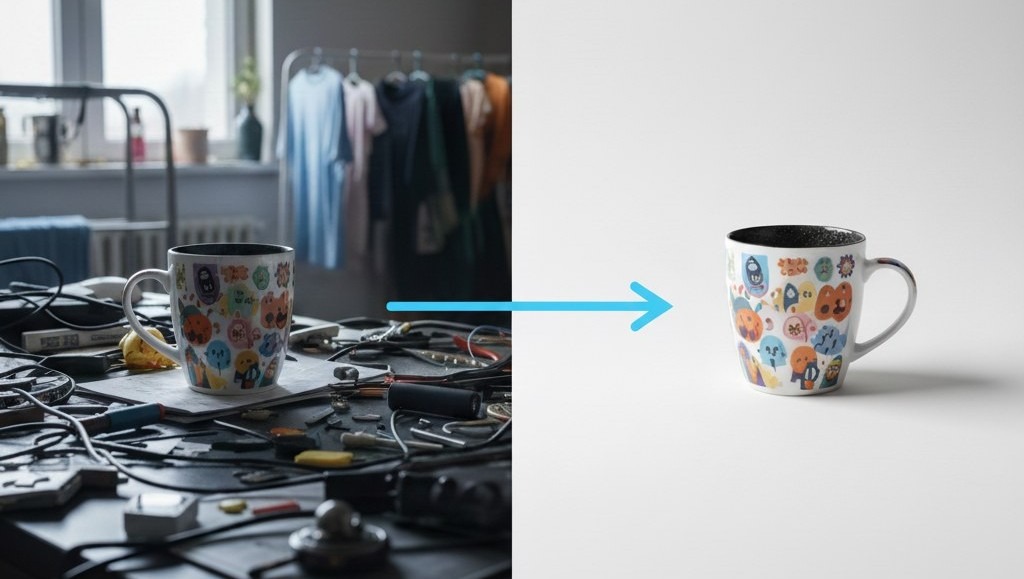
    Want your product photos to look amazing? An AI background remover can help! It’s a tool that lets you remove the background from any image. This makes your product images stand out and look professional. AI Photo Craft is a great tool for this. It uses AI to remove backgrounds and make your photos shine quickly. 

    What is an AI Background Remover?

    An AI background remover is a tool that uses AI technology to remove the background from an image. The main purpose is to isolate the subject of the photo, like a product, and create a transparent background. This allows you to place the subject on any new background or use it for various design purposes. It’s like magic for your photos!

    How AI Photo Craft Helps

    AI Photo Craft helps you easily remove the background from your image. It uses advanced AI to detect and remove backgrounds in seconds. You can simply upload your image, and the tool will automatically remove the background. This is super helpful for creating product photos for your online store. It makes the whole photo editing process much faster and simpler.

    Overview of Features

    AI Photo Craft offers many features, including background removal capabilities, summarized below. You can also upload your photo to see the effect.

    FeatureDescription
    Background RemovalQuickly remove the background from any image with a few clicks.
    Background OptionsCreate a transparent background or replace it with a color or new image.
    Batch ProcessingRemove backgrounds from multiple images at once.

    Benefits of Using AI Photo Craft for Product Photos

    Product background remove for Small Business

    Improved Image Quality

    Using AI Photo Craft to remove image backgrounds improves image quality. When you remove the background, the focus shifts entirely to the product. This makes the product images look cleaner and more professional, which can attract more customers to your online store. A high-quality image makes a big difference!

    Time-Saving Background Removal

    Manually removing backgrounds can take a lot of time. AI Photo Craft lets you quickly remove background in seconds. With AI technology, the background from an image is removed automatically. This time-saving feature allows you to focus on other important aspects of your business. No more tedious photo editing!

    Cost-Effective Solution

    Hiring a professional photo editor can be expensive. A free AI background remover like AI Photo Craft is a cost-effective solution. You can remove background from your image without spending a lot of money. This is especially useful for small businesses and online sellers who want to save on photo editing costs. It’s like having a professional photo editor for free!

    Step-by-Step Guide to Remove Backgrounds Using AI Photo Craft

    Step 1: Upload an Image

    To start, simply upload your image to AI Photo Craft. Our AI background remover makes this process super easy. Just click the upload button and select the product photo you want to edit. AI Photo Craft supports various image formats, so you can upload your photo without worrying about compatibility. Once you upload an image, get ready to instantly remove the background!

    Step 2: Automatic Background Removal

    After you upload your image, AI Photo Craft will automatically remove the background. Using advanced AI, the tool will detect and remove the background in seconds. You’ll see how quickly removing the background from your image becomes a reality. The AI technology ensures a clean and precise background removal, leaving you with a professional-looking product photo.

    Step 3: Download and Save Your Image

    Once the AI background remover has done its magic, you can download your new image with a transparent background. AI Photo Craft lets you save the image in various formats, so you can use it anywhere you need. It’s that simple to remove the background from your image and get high-quality product photos. You can also replace the background with a background color!

    Tips for Professional and Clean Product Photos

    Choosing the Right Background Color

    Selecting the right background color can greatly enhance your product photos. A white or light-colored background is often best because it makes your product stand out. You can easily replace the old background with a new background color using AI Photo Craft. This ensures that your product images look clean and professional. This will improve your online store.

    Lighting and Angles Matter

    Good lighting and the right angles are key to great product photos. Make sure your product is well-lit to highlight its features. Experiment with different angles to find the most appealing view. Proper lighting and angles can significantly improve the overall look of your product images. AI Photo Craft helps with removing backgrounds and editing, but great lighting is important.

    Editing for a Polished Look

    Even after using an AI background remover, a little editing can go a long way. Adjust brightness, contrast, and saturation to make your product photos look their best. AI Photo Craft can help with basic photo editing tasks to give your images a polished finish. By using our free ai background remover, you can also replace the background and edit it.

    Common Mistakes to Avoid When Using AI Photo Craft

    Not Checking Image Quality

    One common mistake is not checking the image quality after using an AI background remover. Make sure the product images are clear and sharp. If the original image background is blurry, even the best AI background remover can’t fix it. Always upload your image in the highest resolution possible to ensure a high-quality image and a clean background removal.

    Ignoring Background Color Contrast

    Ignoring the background color contrast can also affect the final result. If your product and the background color are too similar, the ai background remover might struggle to detect and remove the background from an image accurately. Choose a background color that contrasts well with your product to achieve a clean and professional look with our free ai background remover.

    Over-editing Product Images

    Over-editing product images is another common pitfall. While it’s tempting to enhance every aspect, too much editing can make your product images look unnatural. Use AI Photo Craft to remove background and make necessary adjustments, but avoid excessive filters or drastic changes. A subtle, natural look is often more appealing to potential customers in your online store.

    Conclusion: Why AI Photo Craft’s AI Background Remover is Essential

     An AI background remover like AI Photo Craft is essential for creating stunning product photos. It lets you quickly remove background, improve image background quality, and save time and money. By avoiding common mistakes and following our tips, you can create professional-looking product images that attract more customers to your online store.

    Final Thoughts on E-commerce Benefits

    For e-commerce and online sellers, using AI Photo Craft to remove background is a game-changer. A transparent background or a clean new background enhances the visual appeal of your product images. This can lead to increased sales and customer satisfaction. Embrace the power of ai technology to elevate your product photos and stand out from the competition using our background remover tool.

    FAQs

    1. How does the AI background remover work?

    The ai background remover works by using advanced ai algorithms to detect and remove the background from an image. When you upload your image, the ai technology analyzes the photo and identifies the subject. It then automatically removes the background from the image, leaving you with a clean, professional-looking photo with a transparent background or with background color.

    2. Is AI Photo Craft free to use?

    Yes, AI Photo Craft offers a free ai background remover option for basic use. You can quickly remove the background from your product photos without spending any money. For more advanced features, there might be a premium version available, but the free ai option is perfect for getting started and improving your product images in your online store.

    3. Can I change the background color after removal?

    Yes, after you remove the background using AI Photo Craft, you can easily change the background color. The tool allows you to replace the transparent background with a solid background color of your choice. This feature is great for creating consistent and visually appealing product images for your online store using our free background remover.

  • Free Couple Face Swap API for Mobile Apps and SaaS Websites

    Free Couple Face Swap API for Mobile Apps and SaaS Websites

    free couple face swap

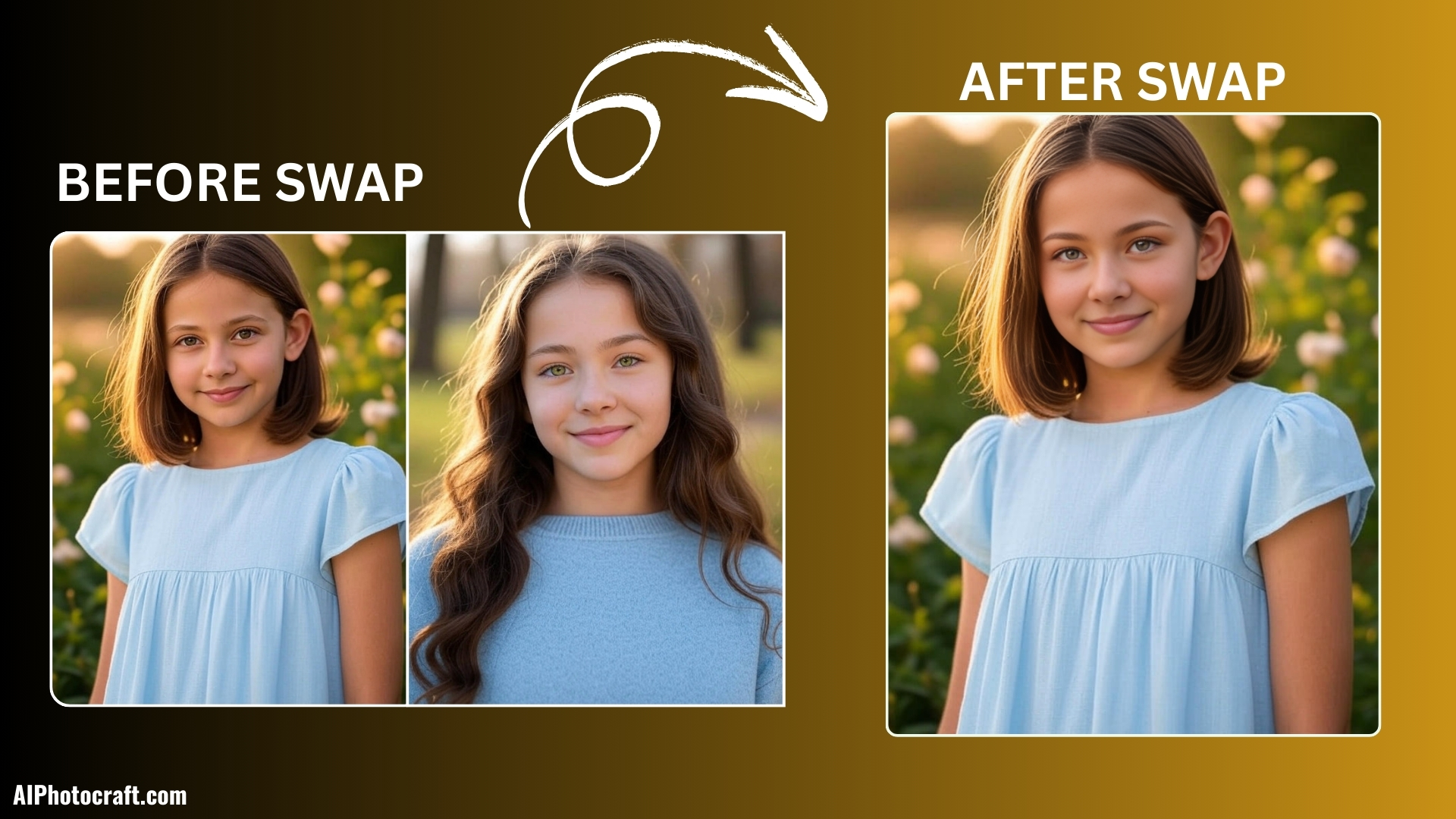
    Do you want to add a fun and exciting feature to your mobile app or SaaS website? The Free Couple Face Swap API by AIPhotoCraft is here to help. With this API, you can let your users swap faces in photos quickly and easily. It’s perfect for apps that focus on photography, entertainment, or social media.

    What is the Free Couple Face Swap API?

    The Couple Face Swap API is a tool that allows developers to swap faces between two people in an image automatically. Using advanced AI technology, the API detects faces, swaps them, and keeps the output realistic.

    Some key features of the API are:

    • Automatic face detection: No manual cropping or adjustments required.
    • High-quality results: Maintains skin tone, texture, and lighting.
    • Supports HD images: Works with high-resolution images for professional results.
    • Fast processing: Swaps faces in seconds.
    • Simple integration: Easy to connect with mobile apps, web apps, or SaaS platforms.

    Whether your app is for couples, social media, or fun photo editing, this API can create entertaining and shareable content that users love.

    Why Use the Couple Face Swap API in Your App?

    Adding a face swap feature to your app can help you:

    • Increase user engagement: Fun tools keep users active.
    • Boost social sharing: Users will share swapped photos with friends.
    • Enhance app experience: Makes photo editing apps more interactive.
    • Attract more downloads: Features like face swap are trendy.

    If you are looking to improve user interaction, you can also check our guide on Top Free APIs for Mobile Apps to explore more features.

    Where to Get the Free Couple Face Swap API

    You can get the API directly from the AIPhotoCraft Developer Dashboard. Here’s how:

    1. Visit aiphotocraft.com
    2. Create a free developer account.
    3. Generate your API key.
    4. Access the API documentation and example code.

    The API comes with a Free Tier that allows you to test the feature before scaling. You can also upgrade to premium plans for higher usage.

    How to Use the Free Couple Face Swap API

    Integrating the API is simple and straightforward. You can use it in mobile apps, web apps, or SaaS websites.

    Step 1: Get Your API Key

    After signing up, copy your API key from the dashboard. This key is needed to authenticate your requests.

    Step 2: Upload Your Image

    Send a POST request to the API endpoint with the image that contains two faces. The API automatically detects faces and swaps them.

    Here’s an example using JavaScript:

    const url = “https://taiapi.aiphotocraft.com/api/faceswap/faceswap2”;

    const formData = new FormData();

    formData.append(“srcimage”, sourceFile);

    formData.append(“targetimage”, targetFile);

    formData.append(“swap_index”, “0,1”);

    const response = await fetch(url, {

      method: “POST”,

      headers: {

        “X-Api-Key”: “YOUR_API_KEY”,

        “accept”: “application/json”,

      },

      body: formData,

    });

    const data = await response.json();

    console.log(data);

    Step 3: Get the Result

    The API returns the swapped image either in JSON or base64 format. You can display it directly in your app.

    Step 4: Display or Download the Image

    Users can preview the result instantly and download the final swapped photo. This creates a fun and interactive experience that keeps them coming back.

    Use Cases of the Couple Face Swap API

    The Couple Face Swap API is perfect for a variety of applications:

    • Couple photo editing apps: Swap faces for fun and share moments.
    • Wedding or anniversary apps: Create playful memories.
    • Social media apps: Let users generate content for Instagram, Facebook, or TikTok.
    • Entertainment platforms: Generate funny or creative images.
    • AI photo studios: Add a new creative feature.
    • Dating apps: Make profiles more engaging.
    • Marketing campaigns: Generate interactive content for promotions.

    The API can be used anywhere you want to increase engagement and user interaction.

    Advantages of AIPhotoCraft Free Couple Face Swap API

    Here’s why this API stands out:

    1. Free Tier: Test the API with no cost.
    2. High-Quality Results: Swaps faces naturally and realistically.
    3. Easy to Integrate: Simple API calls for developers.
    4. Fast Processing: Get results in seconds.
    5. Cloud-Based: No need for heavy local computation.
    6. Cross-Platform: Works with iOS, Android, and web apps.
    7. Developer-Friendly: Clear documentation and example code.

    Adding this API makes your app or SaaS website more engaging without spending weeks on development.

    How to Make the Most Out of the API

    • Combine with other AI features: Add filters, stickers, or background removal for a complete photo editing experience.
    • Create contests: Let users swap faces and share on social media.
    • Offer download options: Let users save or share images instantly.
    • Track engagement: Monitor API usage to see which features are most popular.

    By combining these strategies, your app can become highly engaging and shareable, driving more downloads and usage.

    Conclusion

    The AIPhotoCraft Free Couple Face Swap API is an excellent choice for mobile apps and SaaS websites. It is easy to integrate, produces realistic results, and is completely free to start.

    By using this API, you can:

    • Engage users with fun photo features.
    • Boost social sharing.
    • Make your app stand out in the crowded market.

    Start using the Couple Face Swap API today and create a unique, interactive experience for your users.

    For more API options, check our Complete Guide to Free APIs for Apps.

    FAQs

    1. What is the Free Couple Face Swap API?

    The Free Couple Face Swap API by AIPhotoCraft lets you automatically swap faces between two people in a photo using AI. It creates realistic and fun images for apps, websites, and SaaS platforms.

    2. How can I use the API in my mobile app or website?

    You can integrate the API by signing up on the AIPhotoCraft Developer Dashboard, getting your API key, and sending a POST request with the photo. The API returns the swapped image instantly, which you can display or let users download.

    3. Is the API free to use?

    Yes. The API has a Free Tier for developers to test and use in apps. For higher limits or advanced features, you can upgrade to paid plans.

    4. Does it work on all devices and platforms?

    Yes. The API is cloud-based and works with iOS, Android, web apps, and SaaS platforms. No special hardware is required.

    5. How realistic are the swapped images?

    The API uses advanced AI to preserve facial expressions, skin tone, and lighting, producing high-quality and natural-looking swapped images suitable for social media and app use.

  • How to Enable API Access in AIPhotoCraft (Step-by-Step Guide)

    How to Enable API Access in AIPhotoCraft (Step-by-Step Guide)

    Introduction

    AIPhotoCraft is a powerful AI-driven platform that provides advanced image-editing capabilities such as AI face swap, image enhancement, background removal, object removal, retouching, upscaling, avatar creation, and more.
    Developers can integrate all these tools directly into their applications using the AIPhotoCraft API.

    API access is important because it allows developers to:

    • Automate image editing
    • Build AI-powered website and app features
    • Connect AI photo tools to workflows
    • Create custom image processing pipelines
    • Develop SaaS products using AIPhotoCraft tools

    This guide explains how to enable API access in AIPhotoCraft—with screenshots placeholders—and includes the full list of available APIs.

    What is AIPhotoCraft API?

    The AIPhotoCraft API is a developer-friendly interface that lets you send image-editing requests programmatically and receive processed images via endpoints.

    Meaning of the API

    It enables developers to connect their applications with AIPhotoCraft and access tools like face swap, image enhancer, upscaler, Hair Style Change, Virtual Try-on and more…

    Key features

    • Easy-to-use REST API
    • Supports multiple AI image transformations
    • Fast processing and response times
    • Secure API authentication
    • Scalable for small and large projects

    Benefits for developers

    • Automate repetitive editing tasks
    • Integrate AI tools into mobile and web apps
    • Create custom workflows
    • Save time on manual editing
    • Build AI-powered SaaS products

    Step-by-Step Guide to Enable API Access

    Step 1 — Log In to Your AIPhotoCraft Dashboard

    Go to the AIPhotoCraft website and sign in using your account credentials. Once logged in, you’ll be redirected to your main dashboard.

    Login Aiphotocraft dashboard

    Step 2 — Click on “Generate API Key”

    Inside the API section, click the Generate API Key button. AIPhotoCraft will automatically create a unique key for your account.

    Generate api key in ai photo craft

    Step 3 — Copy and Save Your API Key Securely

    Once the key appears, copy it and store it in a secure location such as a password manager or environment variable.

    Copy api key

    Step 4 — Activate API Access 

    Some accounts may need to explicitly toggle API Access ON. Make sure the status is active.

    API-enable Subscription Plan

    How to Use Your API Key

    Example cURL Request

    curl -X POST “https://aiapi.aiphotocraft.com/api/faceswap/basicswap” \

      -H “accept: application/json” \

      -H “X-Api-Key: YOUR_API_KEY” \

      -H “Content-Type: multipart/form-data” \

      -F “srcimage=@source.jpg;type=image/jpeg” \

      -F “targetimage=@target.jpg;type=image/jpeg” \

      -F “enhance=true”

    Example JavaScript Fetch Request

    const url = “https://aiapi.aiphotocraft.com/api/faceswap/basicswap”;

    const formData = new FormData();

    formData.append(“srcimage”, sourceFile);

    formData.append(“targetimage”, targetFile);

    formData.append(“enhance”, “true”);

    const response = await fetch(url, {

      method: “POST”,

      headers: {

        “X-Api-Key”: “YOUR_API_KEY”,

        “accept”: “application/json”,

      },

      body: formData,

    });

    const data = await response.json();

    console.log(data);

    Understanding API Authentication

    AIPhotoCraft uses Bearer token authentication. This means your API key must be included in every request header to verify your identity and grant access to the tools.

    Common Issues & Troubleshooting

    Invalid API Key

    • Key typed incorrectly
    • Key expired
    • Key deleted or replaced

    Solution: Regenerate the key from the dashboard.

    API Access Disabled

    If your API toggle is off, requests will be rejected.

    Solution: Turn on API access in Developer Settings.

    Rate Limit Errors

    Occurs when you exceed the allowed number of API requests.

    Solution: Wait for reset or upgrade your plan.

    Missing Permissions

    Some endpoints may require higher-tier access.

    Solution: Upgrade your subscription or contact support.

    Best Practices for API Security

    Do Not Share Your API Key

    Keep it private and never expose it publicly.

    Rotate API Keys Regularly

    Regenerate keys every few months for enhanced security.

    Use Environment Variables

    Avoid hardcoding keys in your code.

    Conclusion

    In this guide, you learned how to enable API access in AIPhotoCraft using simple steps. Activating API access unlocks advanced automation features, integrates AI tools into your apps, and improves workflow efficiency.

    Understanding the API setup is essential for building powerful, AI-driven applications.

    FAQs

    1.How do I enable API access in AIPhotoCraft?

    You can enable API access by logging into the AIPhotoCraft dashboard, navigating to API Settings, and generating an API key.

    2. Where can I find my AIPhotoCraft API key?

    Your API key is located inside the Developer or API Settings section of your dashboard.

    3. Is the AIPhotoCraft API secure?

    Yes. It uses Bearer token authentication. Just ensure you never share your API key publicly.

    4. Can I use AIPhotoCraft APIs in mobile or web apps?

    Yes. The API supports REST requests, making it compatible with mobile apps, websites, SaaS tools, and backend systems.

  • AI Photo Enhancer Guide: How to Turn Normal Photos Into HD, 4K, and DSLR Quality

    AI Photo Enhancer Guide: How to Turn Normal Photos Into HD, 4K, and DSLR Quality

    In 2025, photo enhancement has become easier, faster, and more accurate than ever. Whether you want to unblur images, increase photo resolution, or convert a normal picture into HD/4K DSLR quality, AI photo enhancers can do it with just a single click.

    Millions of people, from content creators to everyday users, are now searching for tools that can make photos clear, sharp, and professionally polished. That’s why keywords like AI photo enhancer, AI photo clear, AI photo hd, AI photo upscaler, AI photo quality enhancer 4k are trending everywhere.

    This guide will show you exactly how AI photo enhancers work, their benefits, step-by-step usage, tools to choose from, and expert tips to get the best results.

    What Is AI Photocraft’s Photo Enhancer?

    AI Photocraft Photo Enhancer is a powerful AI-driven tool designed to transform low-quality, blurry, or dull images into high-definition masterpieces. It improves clarity, increases resolution, sharpens details, and enhances colors all automatically.

    Whether you’re a photographer, content creator, business owner, or casual user, this tool delivers studio-quality results instantly.

    Why Should You Enhance Your Photos?

    Boost Image Quality

    Turn ordinary photos into crisp, visually appealing images perfect for social media, prints, or digital use with Upscale AI Images, a smart solution that enhances resolution, sharpness, and overall image quality while preserving natural details.

    Improve Professional Presentation

    Ideal for product photos, portfolio images, business websites, LinkedIn, resumes, and more.

    Restore Memories

    Old, faded, and low-resolution photos can be revived with enhanced clarity and details.

    Save Time

    No need for manual editing, AI handles everything with one click.

    How Does AI Photocraft Photo Enhancer Work?

    AI Photocraft uses deep learning to analyze and rebuild image details intelligently.

    1. Image Detection

    AI scans your photo, locates missing details, noise, blur, and resolution issues.

    2. Automatic Enhancement

    The tool sharpens textures, increases pixel quality, brightens colors, and balances light.

    3. Natural Reconstruction

    It enhances the image without over-editing, maintaining natural tones.

    4. One-Click Output

    You get a high-resolution HD or 4K photo instantly.

    Step-by-Step Guide: How to Enhance Any Photo to HD/4K Using AI Photocraft

    free image enhancer

    1. Upload Your Image

    Choose the photo you want to enhance. AI Photocraft supports all common formats like JPG, PNG, and more.

    2. Click “Generate Image”

    Once the photo is uploaded, click the Generate Image button.
    The AI begins processing your image, enhancing sharpness, brightness, and resolution.

    3. Save Your Enhanced Photo

    Preview the result. If you’re satisfied, simply download your HD or 4K image and use it anywhere on social media, presentations, or print.

    Features of AI Photocraft Photo Enhancer

    1. HD & 4K Upscaling

    Increase the resolution of any image while keeping details sharp.

    2. Clarity & Detail Boost

    Remove blur, refine edges, and restore missing textures.

    3. Color & Lighting Adjustment

    AI enhances brightness, contrast, and color balance automatically.

    4. Noise Removal

    Eliminates graininess and improves overall smoothness.

    5. High-Resolution Output

    Perfect for printing, ads, banners, and professional use.

    AI Photo Enhancer vs Traditional Editing

    Feature AI Photocraft Manual Editing 
    Tiime Required SecondsMinuates to hours 
    Skill Level Beginner Friendly Requires editing knowledge Depends on editor 
    OutputNatural HD/4K Depends on editor 
    Cost Affordable Expensive Tools needed 

    Upgrade Any Photo Instantly with AI Photocraft

    AI Photocraft Photo Enhancer has made it extremely easy to transform dull or blurry photos into crisp, high-quality masterpieces. Whether you’re preparing images for work, social media, or personal use, this tool ensures beautiful results with zero effort.

    Give your photos the clarity they deserve quickly, affordably, and professionally.

    FAQ’S

    1. Is AI Photocraft free to use?

    Yes, you get daily credits free. Premium options offer advanced quality.

    2. Will the enhanced images look unnatural?

    No. AI Photocraft focuses on realistic, natural improvements.

    3. Can I use it for large images or prints?

    Absolutely. The tool supports high-resolution output suitable for printing.

    4. Is it safe to upload personal photos?

    Yes. AI Photocraft prioritizes user privacy and does not misuse your images.

    5. Which formats are supported?

    JPG, PNG, and even RAW in some cases.

    6. Do I need editing knowledge?

    Not at all! Anyone can use it with zero experience.

  • Example Post for WordPress

    This is a sample post created to test the basic formatting features of the WordPress CMS.

    Subheading Level 2

    You can use bold text, italic text, and combine both styles.

    1. Step one
    2. Step two
    3. Step three

    This content is only for demonstration purposes. Feel free to edit or delete it.

  • Best Site to Convert Fonts for Free

    Best Site to Convert Fonts for Free

    Choosing the right font can make your design look amazing. Fonts give your website, logo, or poster personality. But sometimes, the font you love does not work on your device, website, or software. Why? Because fonts come in different file formats, and not all formats work everywhere.

    This is where a font converter helps. A font converter changes your font into the format you need so it works on any platform. In this guide, we explain everything in simple words and show you the best free site to convert fonts online.

    What Is a Font Converter?

    A font converter is a tool that changes your font from one format to another.

    For example:

    • TTF → WOFF
    • OTF → WOFF2
    • TTF → OTF

    Think of it like converting a video from MP4 to MP3, but instead, you are converting font files.

    Different formats are used for different purposes:

    FormatBest For
    TTFComputers and apps
    OTFProfessional design software
    WOFFWebsites
    WOFF2Faster websites
    EOTOld browsers
    SVGIcons and older devices

    If your website needs WOFF2 but your font is TTF, a converter solves this problem quickly. That is why font converters are essential for designers, developers, and beginners.

    Why Do You Need to Convert Fonts?

    Font conversion may seem simple, but it is very important. Here’s why:

    ✔ Make Fonts Work Everywhere

    A font may load on your computer but not on your website or mobile device. Converting ensures compatibility across all platforms.

    ✔ Improve Website Speed

    WOFF2 fonts are small in size, so websites load faster. Faster sites improve user experience and SEO rankings.

    ✔ Fix Compatibility Issues

    Some applications and web tools only accept certain formats. A converter ensures your font works wherever you need it.

    ✔ Keep Brand Style Consistent

    Using the same font on your website, social media, and documents keeps your branding professional and consistent.

    ✔ Reduce File Size

    Smaller font files make your website faster, saving bandwidth and improving performance.

    Features of a Good Font Converter

    Not all font converters are the same. The best ones have:

    ✔ Support for Many Formats

    It should handle TTF, OTF, WOFF, WOFF2, EOT, and SVG.

    ✔ Fast Conversion

    Results in seconds instead of minutes.

    ✔ Easy to Use

    Drag-and-drop upload or click-to-upload systems save time.

    ✔ High-Quality Output

    The font’s shapes, spacing, and details remain intact.

    ✔ Safe & Private

    Files should not be stored or shared.

    ✔ No Signup or Downloads

    Free and online converters are the easiest and safest to use.

    Best Free Font Converter: FreeFontZone Font Converter

    Best Site to Convert Fonts Free Online

    The top tool we recommend is:

     FreeFontZone Font Converter

    Why It Stands Out

    • Simple and beginner-friendly
    • Converts multiple formats in one go
    • Drag-and-drop upload
    • Fast processing
    • Generates CSS @font-face code for websites
    • Works on mobile and desktop
    • Maintains font quality (kerning, hinting, glyphs)
    • Privacy-focused and free

    Perfect for:

    • Web designers
    • Graphic designers
    • Bloggers
    • Developers
    • Students
    • Beginners

    If you want a fast, safe, and free converter, this is the best choice.

    How to Convert Fonts: Step-by-Step

    Here’s the easiest way to convert fonts online:

    1. Visit the website
      Go to FreeFontZone Font Converter.
    2. Upload your font
      Drag your font file into the upload box.
    3. Choose the output format
      Example: TTF → WOFF2 for websites.
    4. Click “Convert”
      The conversion happens in seconds.
    5. Download your converted font
      Now you can use it on websites, apps, or design software.

    It’s simple, fast, and free.

    Extra Tips for Font Conversion

    • Convert in batches: If you have multiple fonts, convert them all at once to save time.
    • Check file size: Smaller files load faster online.
    • Backup your fonts: Always save the original font before converting.
    • Generate @font-face CSS: Some converters automatically give website code for embedding fonts.

    Safety Tips When Converting Fonts

    Font conversion is safe if you follow these rules:

    • Use trusted websites – avoid unknown tools.
    • Check the license – some fonts cannot be modified.
    • Avoid sites that store files – good converters delete files quickly.
    • Don’t download suspicious apps – online tools are safer.

    The Future of Fonts

    Typography is evolving fast. Here are the trends:

    Variable Fonts

    One file can adjust weight, width, and style automatically.

     AI-Generated Fonts

    AI can create new fonts or design fonts based on trends.

    Faster Web Fonts

    Better formats like WOFF2 load websites quicker.

    Interactive Fonts

    Fonts may move or change as the user scrolls, clicks, or interacts with the page.

    3D & Animated Fonts

    Fonts may soon appear animated or in 3D, especially in apps and games.

    9. FAQs

    1. Is it legal to convert fonts?

    Yes, if the font license allows it. Always check the license before converting.

    2. What is the best format for websites?

    WOFF2 is the fastest and most compatible format.

    3. Can font quality change after conversion?

    Yes, if you use a poor-quality converter. FreeFontZone keeps quality safe.

    4. Do I need to install software to convert fonts?

    No. Online tools work in your browser.

    5. What is the best free online font converter?

     FreeFontZone Font Converter

    6. Can I convert multiple fonts at once?

    Yes. Many online tools, including FreeFontZone, support batch conversion.

    7. Will conversion affect my website SEO?

    No. Using web-optimized fonts like WOFF2 improves page speed, which can boost SEO.

    10. Conclusion

    Fonts are essential for any design or website. But different platforms require different formats. A font converter solves these issues quickly and easily.

    The best free site to convert fonts is FreeFontZone Font Converter. It is simple, fast, safe, supports multiple formats, and preserves font quality.

    Now you can convert fonts confidently and make your websites, apps, and projects look professional everywhere.

  • Best IOS app for Ai face swap you need to know in 2025:

    Best IOS app for Ai face swap you need to know in 2025:

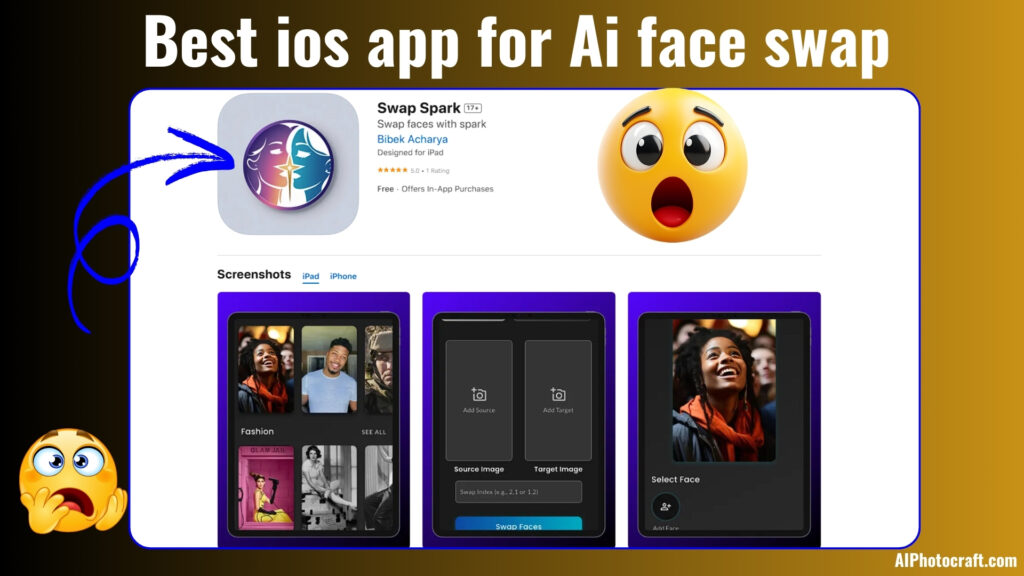
    Hi! Want to swap faces in your photos and have some fun? Let’s talk about Swap Spark, a cool iOS app that makes it super easy with AI. You can create funny or creative pictures in just a few steps. We’ll go over why swap spark ios app for face swap is great, how to use it, and what to know about its features and privacy. Let’s dive deep into the best ios app for ai face swap in details:

    Best ios app for Ai face swap
    Best ios app for Ai face swap

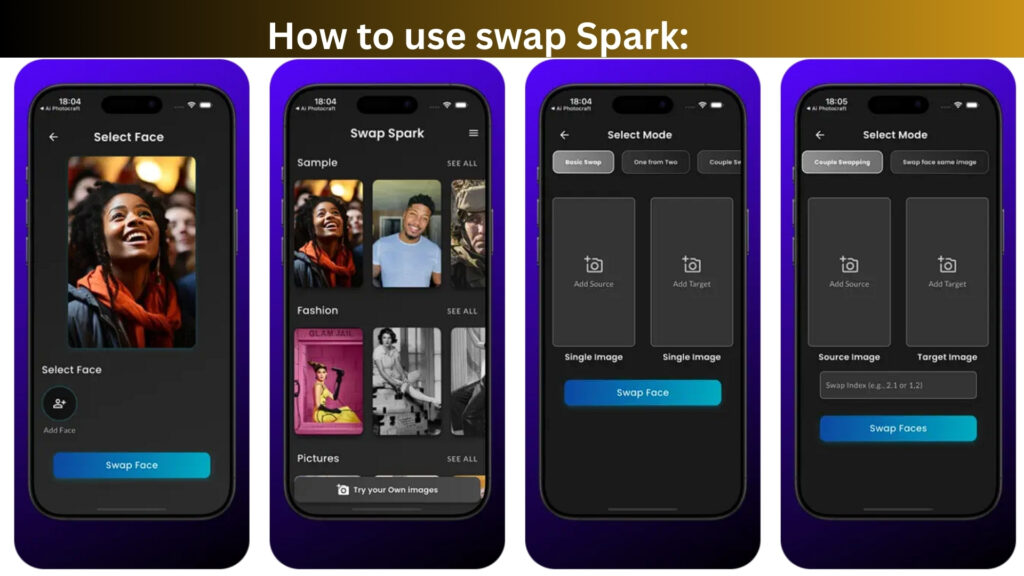
    How to use Swap Spark AI Face Swap:

    1. Open the Swap Spark app on your iOS device.
    2. Select “Select Face” and choose the face you want to use from your photo library or sample images.
    3. Tap “Swap Face” to proceed to the mode selection screen.
    4. Choose “Single Swap” mode and add the source image (face to swap) and target image (where the face will be placed) by tapping the respective “+ photo” buttons.
    5. Adjust the size if needed, then tap “Swap Faces” to process the swap.
    6. Review the result and save the edited image to your device.

    You might also like to read this: How a Small Business Transformed Product Images with AI PhotoCraft Free AI Tools in 2025

    how to use swap spark ai face swap

    Comparing In-App Purchases: Swap Spark vs. Reface:

    When it comes to in-app purchases, both Swap Spark and Reface offer a range of options, but Swap Spark stands out as a more budget-friendly choice for you. Reface provides multiple tiers like Reface MAX Weekly at $8.99-$9.99, Annual Access at $29.99-$44.99, and Lifetime MAX at $39.99-$79.99, which can get pricey depending on the plan.

    On the other hand, Swap Spark’s options are Weekly Pro at $4.99, Monthly Pro at $11.99, and Yearly Pro at $59.99. They are simpler and more affordable, especially the weekly plan, which saves you nearly $5 compared to Reface’s lowest weekly rate. With its lower entry cost and clear pricing, Swap Spark is perfect for you if you want to enjoy AI face-swapping without breaking the bank, giving you flexibility and value right from the start.

    Details about the Swap Spark:

    Topic Details
    App Provider/Developer Bibek Acharya
    Size 75 MB
    Category Entertainment
    Compatibility iPhone: Requires iOS 13.0 or later.
    iPad: Requires iPadOS 13.0 or later.
    iPod touch: Requires iOS 13.0 or later.
    Mac: Requires macOS 11.0 or later and Apple M1 chip or later.
    Apple Vision: Requires visionOS 1.0 or later.
    Languages English
    Age Rating 17+
    Copyright © 2025 Nep Tech Pal
    Price Free
    In-App Purchases Yearly Pro – USD 59.99
    Monthly Pro – USD 11.99
    Weekly Pro – USD 4.99

    Why Swap Spark Prioritizes Your Privacy than Reface AI:

    Swap Spark, developed by Bibek Acharya, takes a simpler approach to privacy compared to Reface. This App makes the better pick for you. While Reface tracks extensive data like purchases, emails, and user IDs for ads and analytics, Swap Spark limits tracking to location and device ID, ensuring your photos and videos aren’t tied to your identity. This focus on minimal data use and functionality over ads makes Swap Spark a safer, more user-friendly choice for your AI face-swapping fun.

    Our Popular Article: Free AI Image Colorizer Tool: Add Natural Color to Black and White Photos Online 2025

    Reason to Use Swap Spark: High Compatibility Across Apple Devices:

    swap spark ios app image screenshot

    Swap Spark stands out due to its excellent compatibility with a wide range of Apple devices, making it a versatile choice for users. It supports iPhone (iOS 13.0 or later), iPad (iPadOS 13.0 or later), iPod touch (iOS 13.0 or later), Mac (macOS 11.0 or later with Apple M1 chip or later), and even Apple Vision (visionOS 1.0 or later).

    This broad compatibility ensures that you can enjoy the app’s AI face-swapping features seamlessly across your Apple ecosystem, whether you’re on the go with your iPhone or working on your Mac, enhancing convenience and accessibility.

    Swap Spark App Privacy:

    Swap Spark, developed by Bibek Acharya, values your privacy and aims to keep your experience both fun and secure.

    1. While using the app, some data like your location or how you interact with features may be used to personalize your experience. This helps the app run smoothly and offer content that matters to you.
    2. Some information might also be used to improve the app’s performance or support third-party services like ads or analytics. However, this data isn’t directly linked to your identity.
    3. Features like uploading photos or videos may need access to certain device functions, but only to make the app more interactive and useful for you.
    4. Privacy practices can vary based on how you use the app, but Swap Spark is designed with user trust in mind. For full details, you can always check the developer’s privacy policy.

    Here is one of the interesting Article you should read: Best Free AI Image Enhancer for Stunning Photos 2025

    Conclusion: Best IOS App for AI Face Swap:

    Swap Spark is a great iOS app for AI face-swapping that’s easy to use, budget-friendly, and privacy-focused. It offers affordable in-app purchases (starting at $4.99 weekly) compared to Reface, works on many Apple devices, and keeps your data safer with minimal tracking. If you want a simple, fun, and trustworthy face-swap app, Swap Spark is the way to go!

    Download this App now and have fun: Click here to download.

  • How a Small Business Transformed Product Images with AI PhotoCraft Free AI Tools in 2025:

    How a Small Business Transformed Product Images with AI PhotoCraft Free AI Tools in 2025:

    In today’s digital marketplace, compelling visuals are crucial for capturing customer attention. For small businesses, producing high-quality product images can be challenging due to limited resources. This is the story of how Gauri Sharma, the owner of Elira Fashion, a local clothing brand from Kathmandu, Nepal, revolutionized her product imagery using AI PhotoCraft’s suite of free AI tools.

    free ai tools

    The Challenge: Lackluster Product Images:

    Gauri faced a common hurdle: her beautifully crafted clothing designs weren’t translating well in product photos. Using a basic smartphone and minimal lighting, the images appeared dull and didn’t showcase the true quality of her fabric or stitching. Hiring a professional photographer and editor wasn’t feasible, so she started looking for a budget-friendly yet effective solution.

    Discovering AI PhotoCraft:

    While researching online tools, Gauri came across AI PhotoCraft, a platform that offered a range of free AI-driven tools designed for photo editing and enhancement. What drew her in was the promise of producing professional-looking visuals with just a few clicks—no editing skills required.

    AI PhotoCraft offers a variety of tools including:

    aiphotocraft ai photo editor
    1. AI Image Enhancer: Automatically improves photo clarity, color balance, and sharpness.
    2. AI Background Remover: Removes photo backgrounds to highlight subjects.
    3. AI Image Upscaler: Enlarges low-res images without pixelation.
    4. AI Face Enhancer: Refines faces in model shots, useful for clothing catalogs.
    5. AI Cartoonizer: Adds a playful, artistic touch to regular photos.
    6. AI Colorizer: Brings black and white images to life with natural colorization.
    7. AI Text to Image Generator: Turns written descriptions into AI-generated visuals.
    8. AI Headshot Generator: Creates professional profile shots.
    9. AI Face Swapper: Swaps faces for fun marketing content or demos.

    Implementing AI PhotoCraft Tools:

    free ai tools
    1. Making Clothing Pop with Image Enhancer:
      Gauri first tried the AI Image Enhancer on her latest product photos. Instantly, her fabric textures looked sharper, colors more vibrant, and overall lighting more balanced. This gave her brand a premium feel without touching Photoshop.
    2. Clean, Distraction-Free Backgrounds:
      With the AI Background Remover, Gauri could remove messy store backdrops and replace them with clean, studio-style backgrounds. Her clothing now stood out clearly, improving focus and consistency across the catalog.
    3. Sharper Images with AI Image Upscaler:
      Some earlier shoots were in low resolution. Rather than reshoot, she used the AI Image Upscaler, which restored image clarity without introducing noise or blur, perfect for printing banners or uploading to high-res platforms.
    4. Model Shots Polished with Face Enhancer:
      Her brand featured models wearing her designs. The AI Face Enhancer made them look flawless. No makeup artist or photo retoucher required. It was a subtle touch that elevated the professionalism of her brand.
    5. Creating Artistic Promos with Cartoonizer:
      To promote a new streetwear collection aimed at younger audiences, Gauri used the AI Cartoonizer to create stylized versions of her product images. These were a hit on Instagram and sparked higher engagement.
    6. Reviving Archives with the Colorizer:
      Gauri had old black-and-white photos of her early tailoring work. The AI Colorizer breathed new life into these by adding realistic color, letting her celebrate her brand’s journey through a “Then vs Now” campaign.
    7. Prototyping with AI Text-to-Image:
      Before producing physical samples, Gauri used the AI Text to Image Generator to visualize her ideas. She typed prompts like “flowy cotton dress in lavender with puffed sleeves,” and received inspiring mockups. This sped up her design process and even helped her crowdsource feedback from customers.
    8. Professional Headshots Without a Photoshoot:
      For her website’s “About the Founder” section, Gauri used the AI Headshot Generator. It produced crisp, business-style portraits that added credibility without booking a studio session.
    9. Fun Marketing with Face Swapper:
      To humanize her brand and entertain her followers, she used the AI Face Swapper to create quirky “Team Elira” posts where team members swapped faces in behind-the-scenes shots. It added humor and relatability to her marketing.

    You may also like to read: Best Free AI Image Enhancer for Stunning Photos 2025

    The Results: A Brand Reinvented with free ai tools:

    aiphtocraft user
    1. Higher Customer Trust: Clean, clear, consistent visuals boosted brand professionalism.
    2. Increased Engagement: Creative content like cartoons and face swaps performed better on social media.
    3. More Sales: With more appealing photos, conversion rates improved in her online store.
    4. Significant Cost Savings: Gauri didn’t need to hire photographers or buy editing software.

    On top of this, AI PhotoCraft’s platform ensured fast uploads, simple UI, and privacy protection. All images are processed in real-time and automatically deleted shortly after (source).

    Gauri’s journey was not just about better photos or more sales. It was something personal. She is a self-taught tailor who puts love into every stitch. When she saw her designs finally look good online, she cried. “For years, I felt unseen,” she said. “Now, when people ask me, ‘Is this really handmade?’ I know the photos show the true quality of my work.”

    Our Popular Article: Free AI Image Colorizer Tool: Add Natural Color to Black and White Photos Online 2025

    AI PhotoCraft helped more than just her brand. It gave her confidence. Gauri takes care of her two kids and runs her clothing business. She used to stay up late trying to edit photos by herself. Now, AI PhotoCraft does that for her. She has more time to do what she loves, which is designing clothes. “My hands are back where they belong,” she said with a smile. “With the fabric. That is the real magic.”

    FAQs: Frequently Asked Questions about AIPhotocraft free ai tools:

    1. What is AI PhotoCraft and who is it for?
      AI PhotoCraft is a free platform offering AI-powered tools for editing and enhancing product photos. It’s ideal for small business owners, creators, and entrepreneurs who want professional-looking visuals without needing advanced photo editing skills or expensive software.
    2. How can AI PhotoCraft help my product photos stand out?
      With tools like the AI Image Enhancer, Background Remover, and Image Upscaler, AI PhotoCraft improves clarity, color, and sharpness that makes your product images look clean, polished, and professional with just a few clicks.
    3. Can I use AI PhotoCraft without design experience or software?
      Yes! AI PhotoCraft is beginner-friendly and works directly in your browser. You don’t need any design background or to install any software. Just upload your image and choose a tool. It’s simple.
    4. Are the tools really free, and is my data safe?
      Yes, AI PhotoCraft offers a range of free tools. Your images are processed in real-time and are automatically deleted shortly after for privacy and data protection.
    5. What types of images can I create with AI PhotoCraft?
      From product photos and catalog images to artistic visuals and marketing content, you can use tools like the Cartoonizer, Text-to-Image Generator, Face Swapper, and Headshot Generator to create everything from fun social media posts to professional website assets.

    Read this Article: How to Generate Video from Image Using AI: A Step-by-Step Guide

    Conclusion: AIphotocraft free AI tools:

    Gauri Sharma turned a visual weakness into her brand’s strength using AI PhotoCraft’s powerful, free AI tools. From enhancing fabric details to visualizing future collections, she managed everything from her laptop. No design degree, no expensive gear.

    If you’re a small business owner like Gauri, give AI PhotoCraft a try. Whether you’re in fashion, accessories, or food, these tools will transform how your products look online and that can make all the difference.

  • Free AI Image Colorizer Tool: Add Natural Color to Black and White Photos Online 2025

    Free AI Image Colorizer Tool: Add Natural Color to Black and White Photos Online 2025

    Free AI Image Colorizer Tool

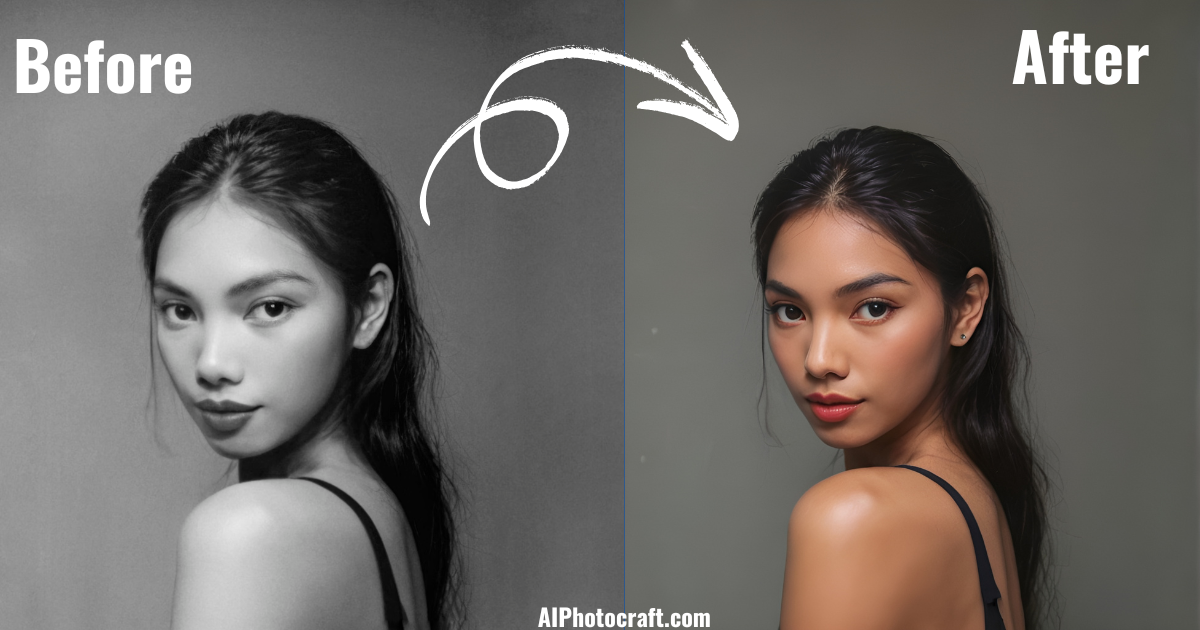
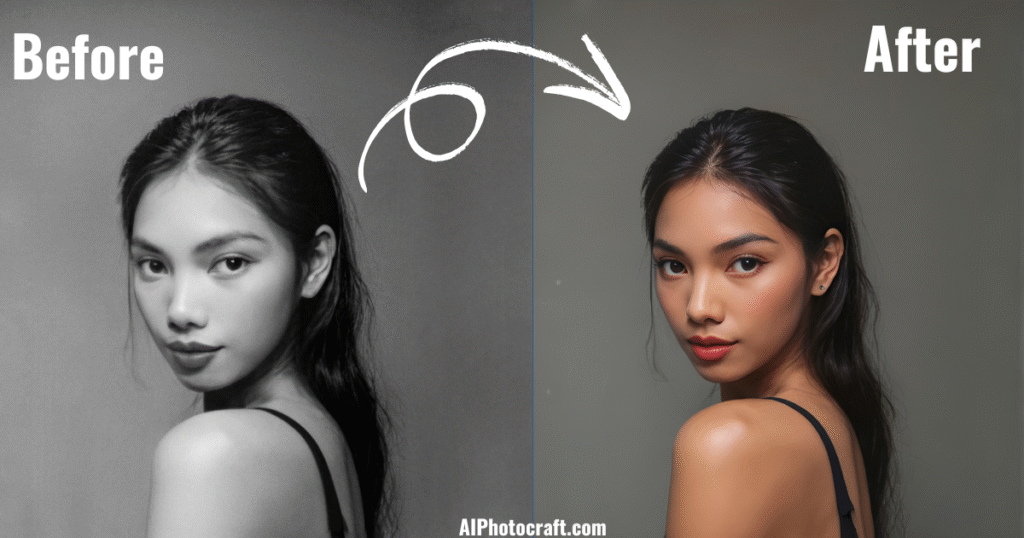
    Imagine you found an old black-and-white photo and wondered what it would look like in color? With today’s technology, you’re just one click away from reviving your memories in full color. Our Free AI Image Colorizer Tool by AI Photocraft brings forgotten moments back to life using the power of artificial intelligence. Whether you’re restoring family portraits, coloring historic photographs, or just exploring creativity, this tool is your best companion.

    What is an AI Image Colorizer and How Does It Work?

    An AI image colorizer is an intelligent photo-editing tool that automatically adds color to black-and-white photos. It doesn’t just randomly paint your picture. It uses advanced algorithms and deep learning to analyze the image. By studying patterns, textures, and familiar objects, it can guess the most realistic colors that should appear.

    people also Like : Best Free AI Image Enhancer for Stunning Photos 2025

    At AI Photocraft, our tool is trained on thousands of real-world images. This means it understands how to apply true-to-life tones to skin, sky, water, clothes, trees, and more. All you need to do is upload your image. The tool takes care of everything else. No Photoshop. No manual editing. Just click, colorize, and enjoy.

    How to Use AI Photocraft’s Free Image Colorizer: Step-by-Step Process:

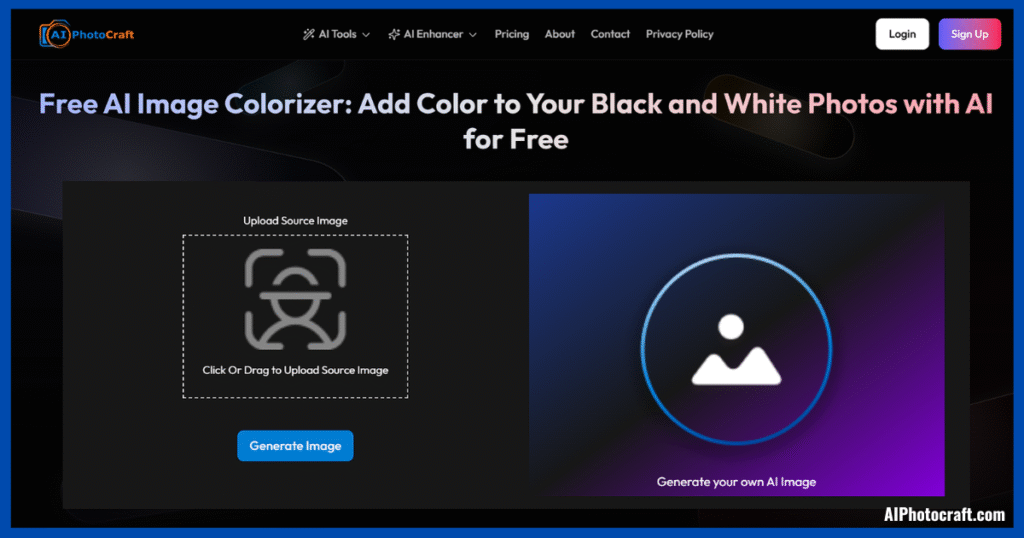
    aiphotocraft image colorizer

    Colorizing your photo is simple and takes less than a minute. Here’s how:

    1. Upload Your Photo: Choose the black-and-white image from your device and upload it into the tool.
    2. Click on ‘Generate Image’: Once uploaded, hit the colorize button. Our AI starts analyzing and coloring the image.
    3. See the Magic Happen: Within seconds, your photo is transformed into a full-color version.
    4. Download or Enhance: Like what you see? Download it or enhance it further using our free tools.

    Key Features of the Free AI Image Colorizer Tool:

    1. Completely Free: There are no hidden costs. Just upload and download.
    2. Fast Processing: Color results generated within seconds.
    3. High-Resolution Output: Great for printing or professional use.
    4. Realistic Colors: Skin tones, backgrounds, and textures look natural.
    5. 100% Secure: Your photos are never stored or shared. They are deleted after processing.
    6. No Skills Needed: Anyone can use it. No design experience required.

    Read this Also: How to Generate Video from Image Using AI: A Step-by-Step Guide

    Why You Should Use an AI Colorizer for Photos:

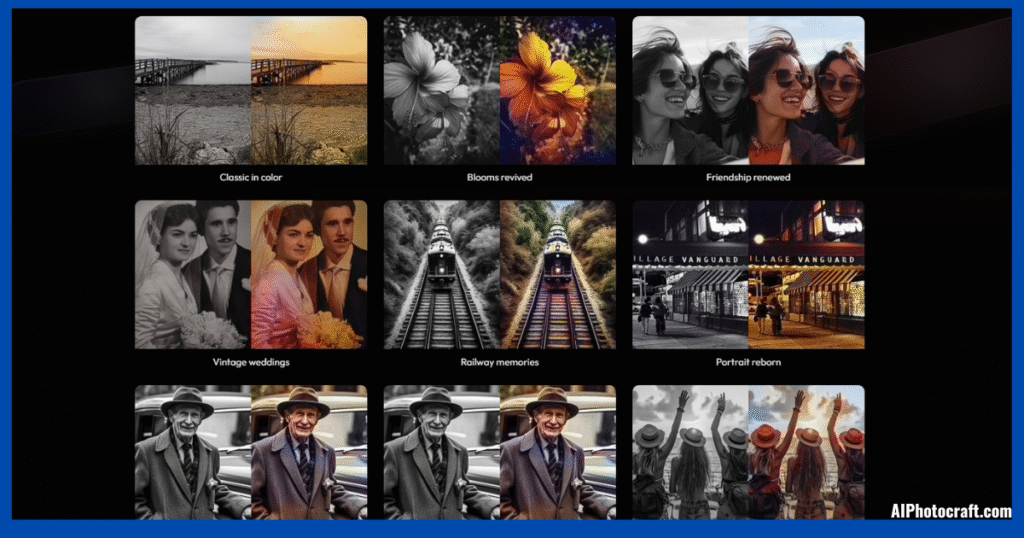
    ai colorizer results

    Black and white photos often feel distant or incomplete. By adding color, you breathe new energy into your visuals. Here are some compelling reasons to try our colorizer:

    1. Revive Precious Memories: See your childhood moments, your grandparents’ portraits, or old holidays come alive with color. The emotional impact is incredible.
    2. Make Educational Content More Engaging: Colorized historical photos make learning more visual and relatable. It is great for students, teachers, and researchers.
    3. Perfect for Creative Projects: Artists, bloggers, and designers can reuse colorized vintage images in unique ways.
    4. Eye-Catching for Social Media: A before-and-after color comparison post is sure to grab attention. Share your results and increase engagement.
    5. Unique Gifts: Create one-of-a-kind gifts. Frame a colorized version of an old photo and surprise your family or friends.

    Use Cases of AI Photo Colorization:

    1. Old Family Albums: Reconnect with family history in a modern, colorful way.
    2. Vintage Wedding Photos: Add emotional depth to timeless moments.
    3. Historical Archives: Give museums and classrooms a more visual and engaging look at the past.
    4. Genealogy Projects: Colorized ancestral portraits help make the past feel closer and more personal.
    5. Photo Blogs or Journals: Add new flavor to personal stories or photography collections.
    6. Personalized Cards or Posters: Convert black-and-white images into beautiful printables.

    Bonus Tools for Enhanced Creativity:

    We don’t stop at colorization. At AI Photocraft, we offer more tools to perfect your photos:

    1. Image Enhancer: Sharpen blurry images or improve low-quality photos.
    2. Photo Restoration Tool: Fix faded, scratched, or damaged images before you colorize.
    3. Sketch Generator: Turn any photo into a pencil-drawn sketch. Great for artistic touches.
    4. AI Art Generator: Convert ideas or photos into digital artworks with one click.

    What Makes AI Photocraft the Best Choice?

    1. Built on Advanced AI: Our deep learning models provide unmatched accuracy.
    2. True-to-Life Results: We don’t just color photo but our tool mimics how a photo would’ve looked in reality.
    3. Simple, Clean Interface: No distractions. Just you and your photo.
    4. No Sign-Ups or Subscriptions: Truly free. No email required.
    5. Data Privacy First: We care about your privacy. Photos are never saved or misused.

    Final Thoughts: Free AI Image Colorizer Tool

    Black-and-white photos are beautiful. But when you see them in color, they become alive again. Memories become sharper. Emotions feel closer. And people in those photos seem more real.

    With the Free AI Image Colorizer by AI Photocraft, you don’t need editing skills or expensive software. Just upload a photo, hit generate, and watch your black-and-white image turn into a masterpiece.

    So go ahead. colorize your history today. It’s free, easy, secure, and unforgettable.