
Want your product photos to look amazing? An AI background remover can help! It’s a tool that lets you remove the background from any image. This makes your product images stand out and look professional. AI Photo Craft is a great tool for this. It uses AI to remove backgrounds and make your photos shine quickly.
What is an AI Background Remover?
An AI background remover is a tool that uses AI technology to remove the background from an image. The main purpose is to isolate the subject of the photo, like a product, and create a transparent background. This allows you to place the subject on any new background or use it for various design purposes. It’s like magic for your photos!
How AI Photo Craft Helps
AI Photo Craft helps you easily remove the background from your image. It uses advanced AI to detect and remove backgrounds in seconds. You can simply upload your image, and the tool will automatically remove the background. This is super helpful for creating product photos for your online store. It makes the whole photo editing process much faster and simpler.
Overview of Features
AI Photo Craft offers many features, including background removal capabilities, summarized below. You can also upload your photo to see the effect.
| Feature | Description |
| Background Removal | Quickly remove the background from any image with a few clicks. |
| Background Options | Create a transparent background or replace it with a color or new image. |
| Batch Processing | Remove backgrounds from multiple images at once. |
Benefits of Using AI Photo Craft for Product Photos
Improved Image Quality
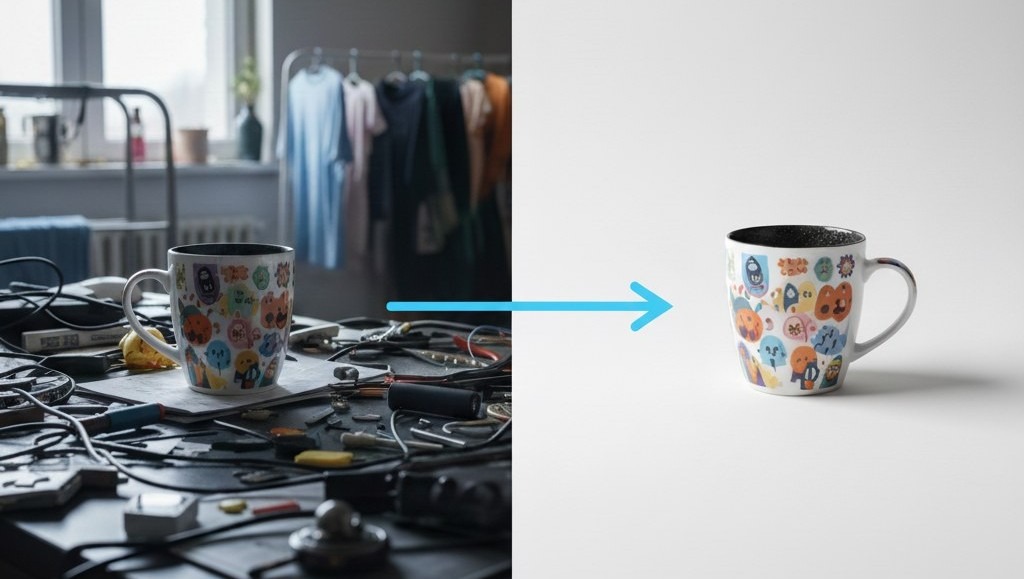
Using AI Photo Craft to remove image backgrounds improves image quality. When you remove the background, the focus shifts entirely to the product. This makes the product images look cleaner and more professional, which can attract more customers to your online store. A high-quality image makes a big difference!
Time-Saving Background Removal
Manually removing backgrounds can take a lot of time. AI Photo Craft lets you quickly remove background in seconds. With AI technology, the background from an image is removed automatically. This time-saving feature allows you to focus on other important aspects of your business. No more tedious photo editing!
Cost-Effective Solution
Hiring a professional photo editor can be expensive. A free AI background remover like AI Photo Craft is a cost-effective solution. You can remove background from your image without spending a lot of money. This is especially useful for small businesses and online sellers who want to save on photo editing costs. It’s like having a professional photo editor for free!
Step-by-Step Guide to Remove Backgrounds Using AI Photo Craft
Step 1: Upload an Image
To start, simply upload your image to AI Photo Craft. Our AI background remover makes this process super easy. Just click the upload button and select the product photo you want to edit. AI Photo Craft supports various image formats, so you can upload your photo without worrying about compatibility. Once you upload an image, get ready to instantly remove the background!
Step 2: Automatic Background Removal
After you upload your image, AI Photo Craft will automatically remove the background. Using advanced AI, the tool will detect and remove the background in seconds. You’ll see how quickly removing the background from your image becomes a reality. The AI technology ensures a clean and precise background removal, leaving you with a professional-looking product photo.
Step 3: Download and Save Your Image
Once the AI background remover has done its magic, you can download your new image with a transparent background. AI Photo Craft lets you save the image in various formats, so you can use it anywhere you need. It’s that simple to remove the background from your image and get high-quality product photos. You can also replace the background with a background color!
Tips for Professional and Clean Product Photos
Choosing the Right Background Color
Selecting the right background color can greatly enhance your product photos. A white or light-colored background is often best because it makes your product stand out. You can easily replace the old background with a new background color using AI Photo Craft. This ensures that your product images look clean and professional. This will improve your online store.
Lighting and Angles Matter
Good lighting and the right angles are key to great product photos. Make sure your product is well-lit to highlight its features. Experiment with different angles to find the most appealing view. Proper lighting and angles can significantly improve the overall look of your product images. AI Photo Craft helps with removing backgrounds and editing, but great lighting is important.
Editing for a Polished Look
Even after using an AI background remover, a little editing can go a long way. Adjust brightness, contrast, and saturation to make your product photos look their best. AI Photo Craft can help with basic photo editing tasks to give your images a polished finish. By using our free ai background remover, you can also replace the background and edit it.
Common Mistakes to Avoid When Using AI Photo Craft
Not Checking Image Quality
One common mistake is not checking the image quality after using an AI background remover. Make sure the product images are clear and sharp. If the original image background is blurry, even the best AI background remover can’t fix it. Always upload your image in the highest resolution possible to ensure a high-quality image and a clean background removal.
Ignoring Background Color Contrast
Ignoring the background color contrast can also affect the final result. If your product and the background color are too similar, the ai background remover might struggle to detect and remove the background from an image accurately. Choose a background color that contrasts well with your product to achieve a clean and professional look with our free ai background remover.
Over-editing Product Images
Over-editing product images is another common pitfall. While it’s tempting to enhance every aspect, too much editing can make your product images look unnatural. Use AI Photo Craft to remove background and make necessary adjustments, but avoid excessive filters or drastic changes. A subtle, natural look is often more appealing to potential customers in your online store.
Conclusion: Why AI Photo Craft’s AI Background Remover is Essential
An AI background remover like AI Photo Craft is essential for creating stunning product photos. It lets you quickly remove background, improve image background quality, and save time and money. By avoiding common mistakes and following our tips, you can create professional-looking product images that attract more customers to your online store.
Final Thoughts on E-commerce Benefits
For e-commerce and online sellers, using AI Photo Craft to remove background is a game-changer. A transparent background or a clean new background enhances the visual appeal of your product images. This can lead to increased sales and customer satisfaction. Embrace the power of ai technology to elevate your product photos and stand out from the competition using our background remover tool.
FAQs
1. How does the AI background remover work?
The ai background remover works by using advanced ai algorithms to detect and remove the background from an image. When you upload your image, the ai technology analyzes the photo and identifies the subject. It then automatically removes the background from the image, leaving you with a clean, professional-looking photo with a transparent background or with background color.
2. Is AI Photo Craft free to use?
Yes, AI Photo Craft offers a free ai background remover option for basic use. You can quickly remove the background from your product photos without spending any money. For more advanced features, there might be a premium version available, but the free ai option is perfect for getting started and improving your product images in your online store.
3. Can I change the background color after removal?
Yes, after you remove the background using AI Photo Craft, you can easily change the background color. The tool allows you to replace the transparent background with a solid background color of your choice. This feature is great for creating consistent and visually appealing product images for your online store using our free background remover.
Leave a Reply